
Map Mode — Stations & Legs
In scroll mode time is the playhead moving along a strip, and in page mode it is the page that is showing. In map mode the score is a space, a map, and the piece is a route through it: the camera travels from place to place, stays a while at each, and moves on.
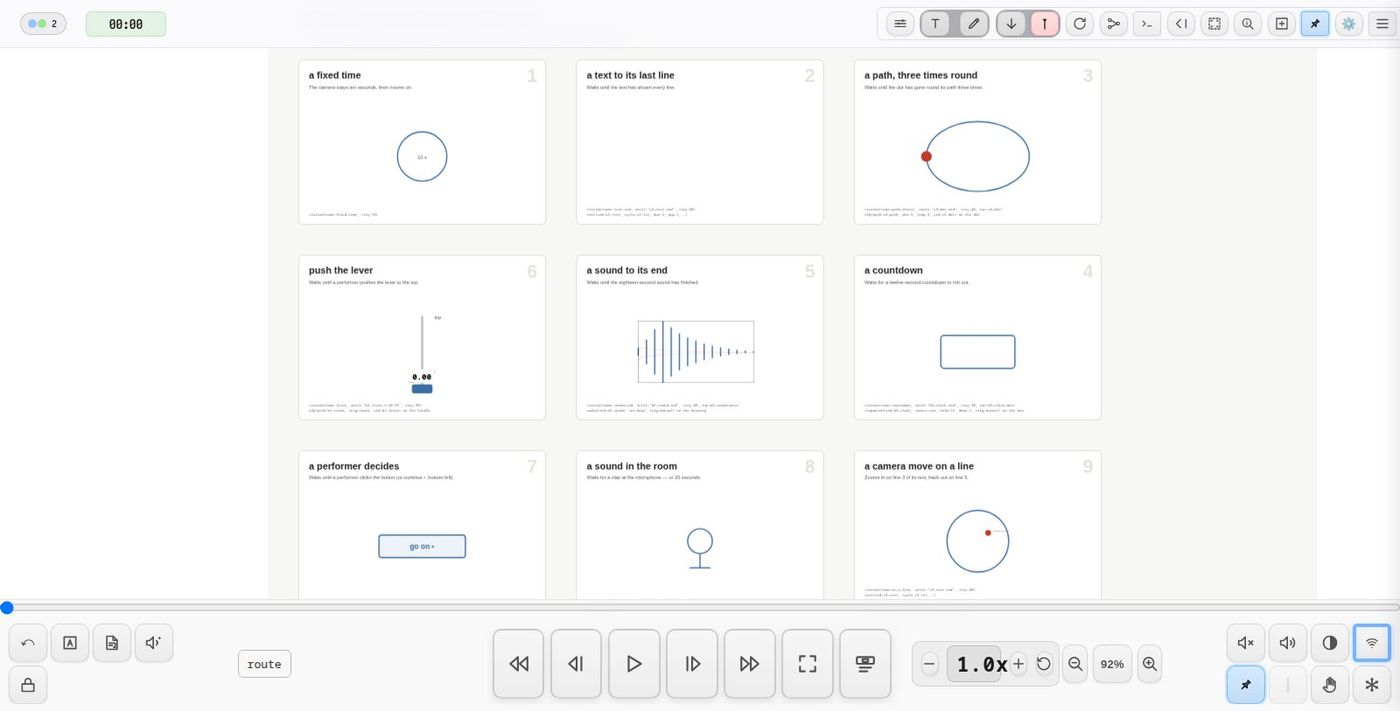
- A station is a place on the map: what the camera frames there, how long it stays, and what happens while it does.
- A leg is the move from one station to the next: how long the camera takes, and anything that should start on the way.
- The route is the stations joined by their legs. A cursor moves along it: it is map mode's playhead.
Both are drawn in Inkscape, and the timing of the whole piece can be read, and run from any point, in one table.
This page is a guide. Every parameter is listed in
station() and leg().
Map mode, zoom() or trans()?
A piece that moves between fragments can be built three ways. In each one the performer's eye goes from place to place; what differs is what keeps the time and what moves.
- Map mode — the score is a map and the piece is a route of stations. The camera moves; nothing scrolls; the route is the time.
- A scrolling score with
zoom()— the playhead keeps the time as usual, and cues it fires move the camera to a fragment and back. - A scrolling score with
trans()— the camera and the playhead stay; cues move the material, bringing a fragment to where the performer reads.
| Map mode | Scroll + zoom() |
Scroll + trans() |
|
|---|---|---|---|
| What keeps time | the route: a stay at each station, a move between them | the playhead | the playhead |
| How long a section lasts | stay: in beats, or until a gate opens |
how far the playhead has to travel | how far the playhead has to travel |
| Waiting for something | gates: a click, a text's last line, a sound, a sensor (until:) |
pause() holds the transport |
pause() |
| What moves | the camera | the camera | the fragments |
| The rest of the score | out of view until the camera goes there | out of view while zoomed in | stays where it is, around the fragment |
| Rehearsing from a point | the route table: ▶ on any station | the seek bar, rehearsal marks | the seek bar, rehearsal marks |
| Overview of the form | the route table, with the total length | the score itself, left to right | the score itself |
| Several players together | each runs the route on their own device for now | shared: every client follows one playhead | shared: one playhead |
| Drawn in Inkscape as | rectangles (stations) joined by connector arrows (legs) | the fragments, and a cue on the timeline for each move | the fragments, and waypoints for them to travel to |
Choose map mode when the piece is a journey through a space — when how long to stay somewhere depends on what happens there (a text read to its end, a sound, a performer's signal), when the order of places matters more than distances on a timeline, or when you want to run it from any station in rehearsal. Today a route runs on each device separately, so it suits a solo performer, or players who each follow their own route.
Choose zoom() in a scrolling score when the piece has a timeline that
everyone shares, and only some moments need a closer or wider look — a
detail to read, an overview — before the scroll carries on. playhead:stay
lets the view wander while the time stays on the line.
Choose trans() when the movement of the material is part of the
piece — fragments arriving, leaving, gathering at one place — or when the
performer should keep reading in one spot while the score comes to them.
They combine. A scrolling opening can hand over to a route (next: to a
station, see Starting anywhere); a station can run
trans() and zoom() cues of its own during its stay.
Try them side by side: demo-map, demo-zoom and demo-trans.
Map mode: the route is the time
Make a project a map score in its preferences:
"defaultViewMode": "map"
In map mode nothing scrolls. The route is the piece's time, and the transport bar drives it:
| Control | In map mode |
|---|---|
| ▶ / ⏸, space | start the route (from the station on show, or the first), pause it — the stay's clock holds — and resume |
| ↶ | back to the first station, shown and ready for ▶ |
| ⏪ ⏮ ← | back one station |
| ⏩ ⏭ → pedal | leave the current station now (opens any gate) |
| seek bar | how far through the route; let go and the route goes to the station that holds that moment |
The route button and continue ▸ sit in the transport bar. Things only sound while the route runs: crossings of the line are checked while it runs and not while it is paused or idle, and nothing fires while the camera moves.
A score in scroll mode can contain stations too. Its transport stays the scroll transport, the route runs alongside it, and its route button floats at the bottom left of the score.
Drawing a route
Stations are rectangles
Draw a rectangle around what the camera should see at that place. Give it an
id and a cue in data-oscilla (the DSL inspector edits it like any other):
station(name:harbour, stay:40)
On arrival the camera fits the rectangle: its size decides the zoom, and
its centre lands on screen at at: (the middle by default). Move the
rectangle in Inkscape and the framing moves with it.
A station drawn inside a moving group — a backdrop that turns or slides — is carried with that group, so the camera follows its subject as it moves. On turning material the rectangle turns too: it still gives the right zoom and target, but its outline is no longer the screen's frame.
Legs are arrows
Join two stations with Inkscape's connector tool (Ctrl+F2), drawing from the first rectangle to the next. The connector remembers which shapes it joins, so moving a station keeps the arrow attached. Put the leg's cue on the connector:
leg(dur:8)
dur is how long the camera takes to get there; dur:0 is a cut. A leg
can also be any element with from: and to: instead of a connector:
leg(from:harbour, to:reef, dur:8)
The route starts at the station with start:1, or otherwise at the first
station no leg arrives at.
They do not show in performance
Station rectangles and leg arrows are for authoring. Oscilla hides them while the score runs (they can still be measured); tick show on map in the route table to see them.
What happens during a stay
Every other cue on the station's rectangle belongs to its stay. They run
when the camera arrives — never from the playhead — each after its tdelay::
station(name:reef, stay:75)
  draw(start:penA, trig:manual)
  text(uid:reef-story, cycle:reef.txt, dur:4, trig:manual, tdelay:8)
Some cues must stay on their own element — an o2p() moves the element it
sits on, a text(target:self) places itself there. Start those with run:,
which runs that element's cue on arrival, as next:<id> would:
station(name:drift, stay:180, run:[buoy, drift-story])
Following a text, line by line
Timing a camera move against a text by the clock breaks as soon as the text
is re-paced. Instead, wait for the line: every text() publishes which line
it is showing as <uid>.line, and a cue in a stay can trigger on it:
station(name:lighthouse, stay:128, run:keeper-story)
  zoom(to:lamp, scale:40, dur:4, trig:"keeper-story.line==5", tdelay:1)
  zoom(to:lighthouse-tower, scale:9, dur:4, trig:"keeper-story.line==5", tdelay:10)
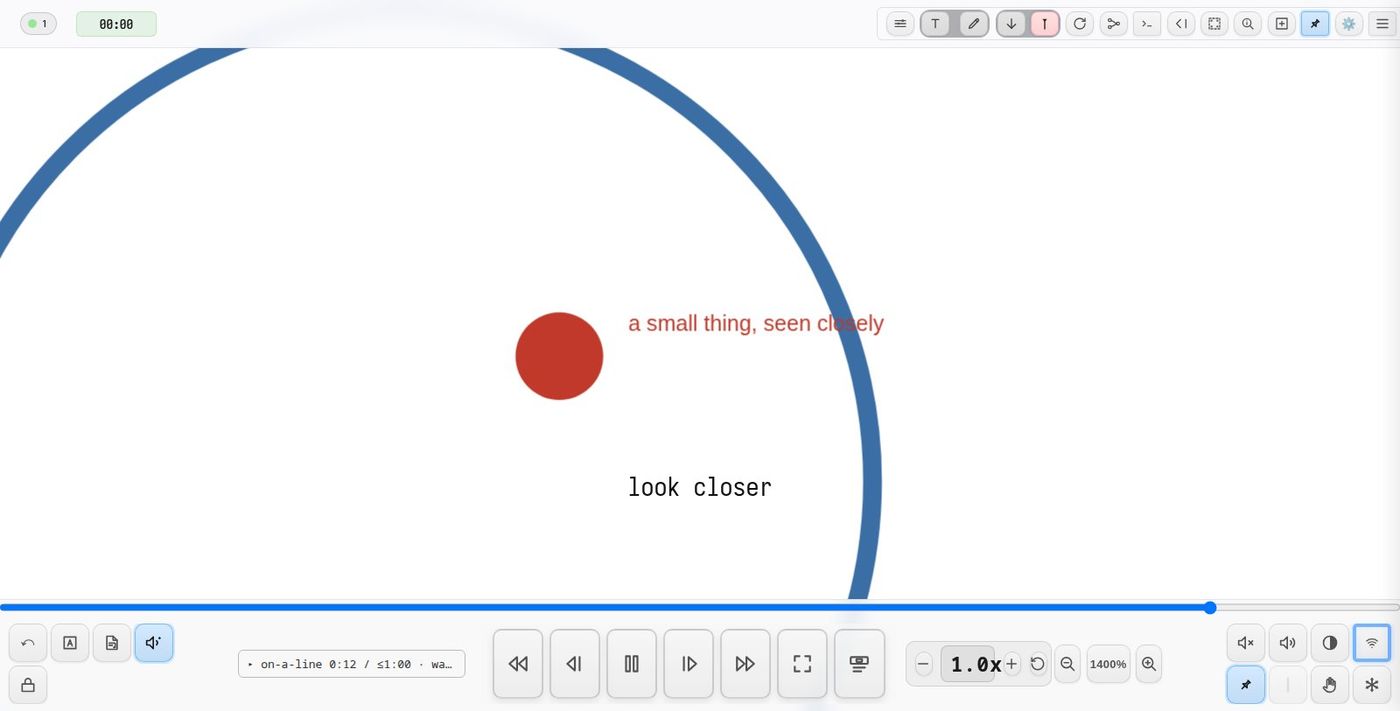
The first zoom starts a beat after line 5 appears, the second ten beats after it, however the text is paced. Conditions must be quoted. A watch on a line lasts as long as the stay.
The playhead line
Give every station a place for the playhead line — edge:<id> (the line just
before that element, or through its centre with align:center) or
playhead:<id>. A station that does not leaves the line wherever the
previous move put it, which may be off screen.
In map mode the line stays put on the screen and the camera moves; a
station that holds on a moving target (hold:next) keeps it on the line as
it turns. Things crossing the line — a turning backdrop's stars — sound as
they cross it.
On material held by a pin() (scroll mode), the
playhead stays where it is and the pin slides until that element is on the
line.
Holding playback (scroll mode)
In a scroll score that contains a route, pause:1 holds the score's
playback for the stay, so material does not scroll on underneath while the
camera is elsewhere. Map mode does not need it: nothing scrolls.
Moving on: stays and gates
stay: is how long the camera stays, in beats or quoted minutes and
seconds (of beats): stay:85, stay:"1:25". A last station without a stay: holds the
view until the route is stopped.
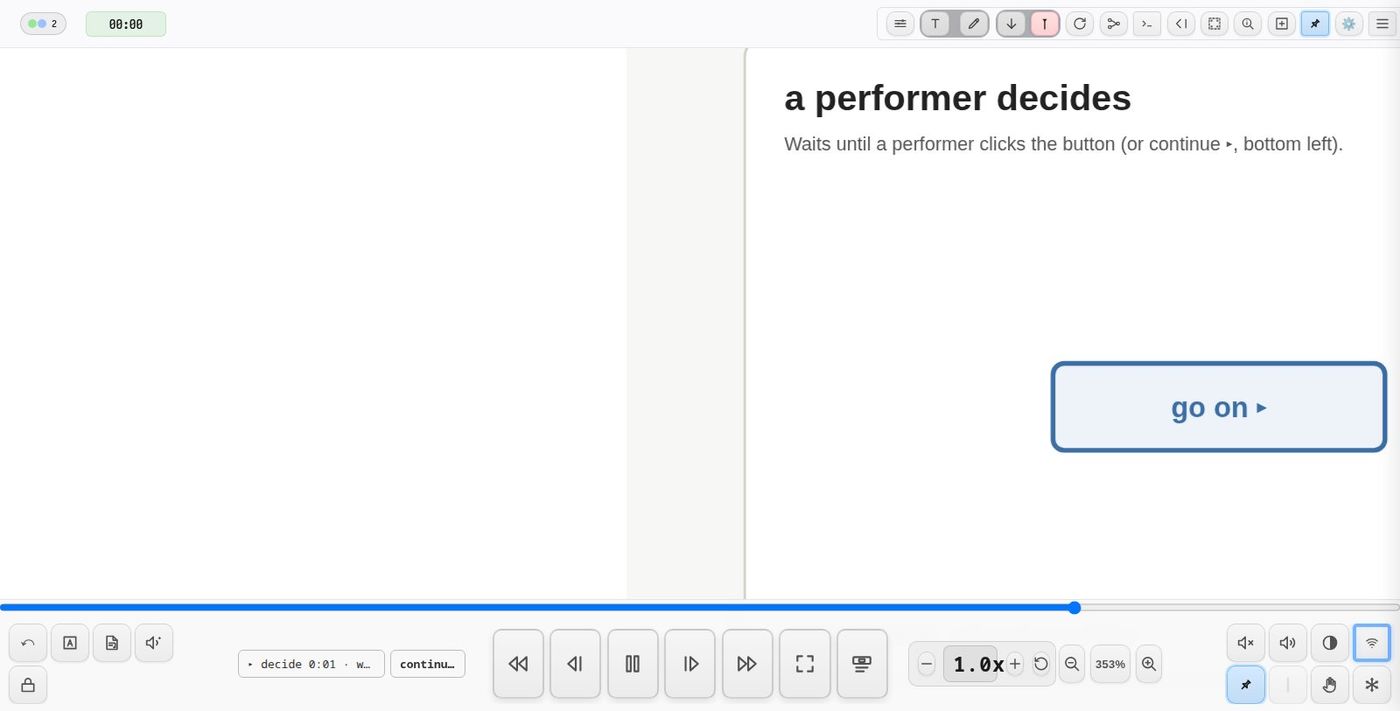
A gate ends a stay on an event instead. With until:, stay: becomes the
longest the station waits, so a gate cannot hang a performance:
station(name:harbour, until:click)                          // a performer moves it on
station(name:drift, until:"buoy.end", stay:240)             // when the buoy's o2p arrives
station(name:storm, until:"adc.onset>0.5", stay:"2:00")     // at a loud sound
until:clickshows a continue ▸ button beside the route button.until:"click:<id>"waits for a click on that element of the score — a button drawn into the station itself. The continue ▸ button appears too, in case the element cannot be reached.- Anything else is a condition, as for
trig:.o2p()andtext()publish<uid>.end— 0 as they start, 1 when they reach their end — so a station can wait for them.
A leg with lead: starts its own cues that many beats before the camera
leaves. After a gate there is no warning, so the cues start as it opens and
the camera leaves lead: beats later.
The route button and table
A score with stations shows a route button — in the transport bar in map
mode, at the bottom left of the score otherwise. While the route runs it
says where it is — ▸ reef 0:42 / 1:15, → lighthouse on a
leg, · waiting at a gate. Click it for the route table:
station      stay    in it                              leg out
harbour      ≤2:00   until click                        8s → reef
reef         1:15    draw penA, text reef.txt @0:08     8s (lead 2) → lighthouse
lighthouse   2:08    run keeper-story,                  10s → drift
                     zoom lamp @keeper-story line 5 +1s
drift        ≤4:00   until buoy.end, run buoy           0s → coda
coda         —                                          end
total ≤ 10:21
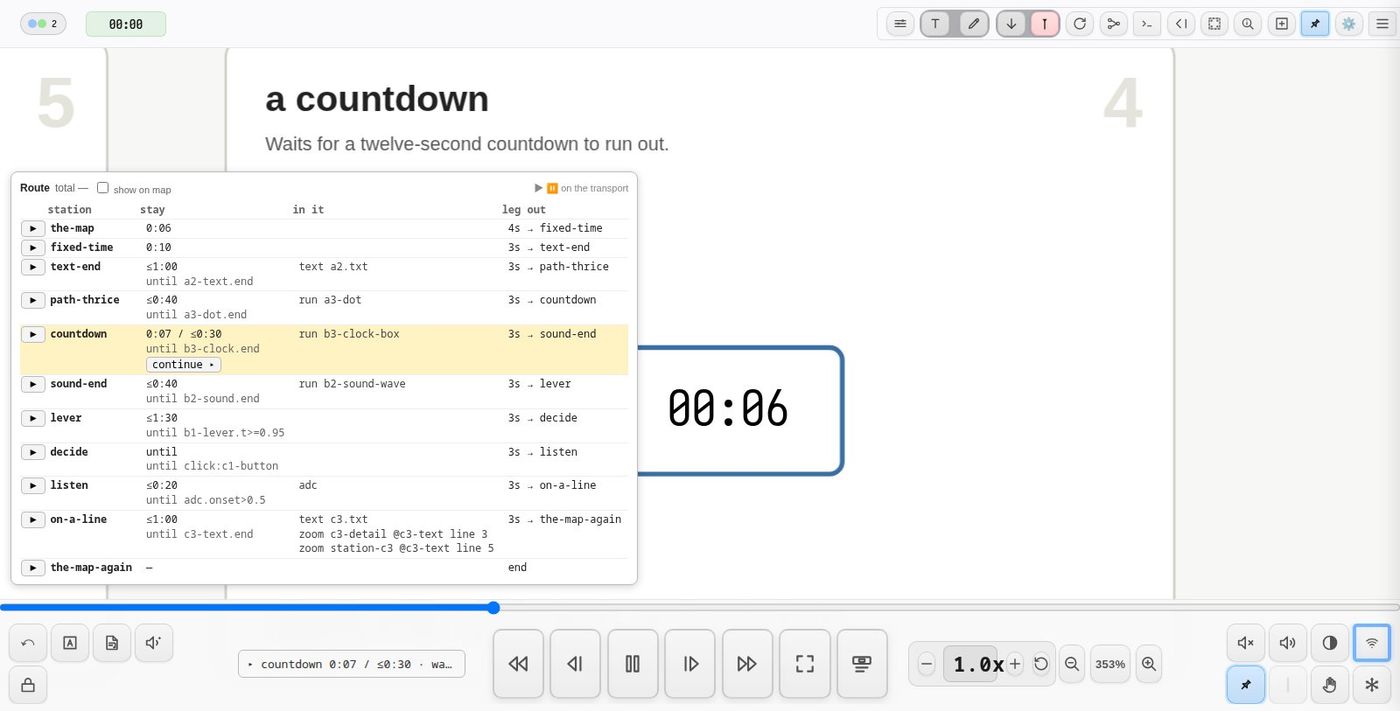
- In map mode the transport starts and pauses the route; in a scroll score the table's ▶ start and ■ stop do.
- ▶ on a row runs it from that station — for rehearsal.
- continue ▸ opens a waiting station's gate.
- show on map shows the station rectangles and arrows.
Changing the times: ✎ edit
✎ edit in the table turns its times into fields: each station's stay and until, and each leg's dur. Change one and press Enter (or click away): it is written to the score at once, as the DSL editor would, and the table's total follows. ✓ done goes back to the plain table.
- stay — beats (
10) or minutes and seconds of beats (1:25); empty means the station holds until stopped. - until — the gate (
click,a2-text.end,adc.onset>0.5…); empty means none. - dur — the leg's beats;
0is a cut.
A value that does not make sense is refused, with a note saying why, and nothing is written. A route that is running keeps its old times until it is started again. A station or arrow with no id of its own in the SVG (the route gives those a temporary one) cannot be saved from here — its field is greyed; give it an id in Inkscape.
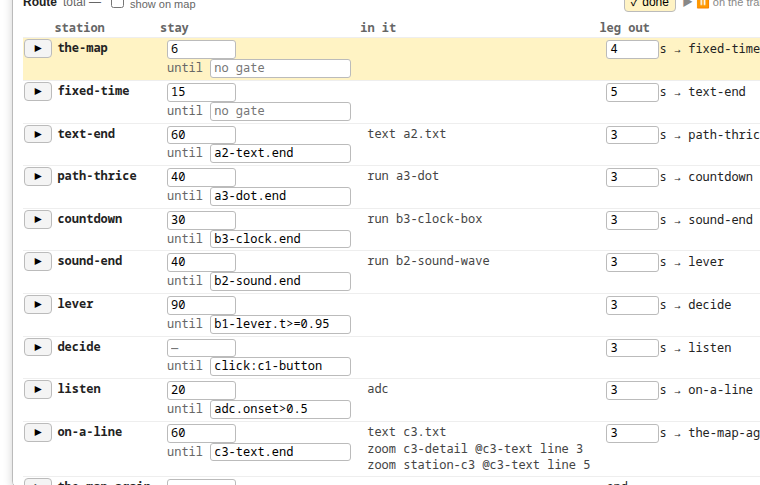
Pausing — ⏸ in map mode, the sequence button in a scroll score — stops the stay's clock, so a stay is held, not cut short. Dragging the score or zooming by hand pauses it too.
Starting anywhere
▶ on a row is a jump, and a jump puts the piece back to how that station expects to find it, whichever direction it goes:
- Everything the route's stations and legs reveal is shown only if the
target's
state:lists it, or it was visible when the score loaded. - Pens that stations start are lifted and their ink wiped; the target starts its own.
- Elements the stations
run:go back to their start, and their texts stop.
station(name:lighthouse, state:[island-outline, harbour-lights], stay:128)
state: says what a station expects to be visible, whatever came before.
Ink from earlier stations is not redrawn.
Leaving a station — along its leg, by a jump, or with ■ — ends what its
stay set going: its texts, its cues still waiting on tdelay: or a line,
and its pause:1 hold. What it revealed and the pens it started are left
for the next station.
A station can also be entered from an ordinary cue — next:<station id>
from a chain, or a cue fired by the playhead — and the route runs on from
there. That is how a scroll-mode opening hands over to a route.
Things to know
- Not in an osc frame. Keep station rectangles and leg arrows out of any
group marked
data-osc-frame. They are hidden but still part of the group's size, and positions sent withosc(pos:1)are measured against that size. - Screen controls in a last layer. Controls held to the screen with
pin(viewport:…)still paint in document order; put them in the last layer so nothing on the score covers them. - Quote what has colons or operators:
stay:"1:25",trig:"story.line==5",until:"adc.onset>0.5". - Not yet: a station with several legs out takes the first (branching routes are planned), and the route runs on each client separately.
Demo project
demo-map — nine stations on a 3×3 grid, each ending its stay a
different way: a fixed time, a text to its last line, an o2p() three times
round, a countdown, a sound to its end, a lever pushed to the top, a
performer's click, a sound in the room, and a camera move on a line of text.
It is a map-mode project: press ▶ on the transport, or open the route
table and press ▶ on any row to start there.
See also
station()andleg()— every parameterzoom()— the camera move a leg makes, and the way to move the view in a scrolling scoretrans()— moving the material instead of the cameratext()—cycle:,gap:,<uid>.line- Conditional triggering — the condition syntax
- Scroll Mode
Tip: use ← → or ↑ ↓ to navigate the docs