
cue:o2p — Object-to-Path Animation
o2p(...) animates an SVG object along a named <path>.
For plain point-to-point movement without a drawn path, see
trans() — o2p is for motion that follows a visible curve.
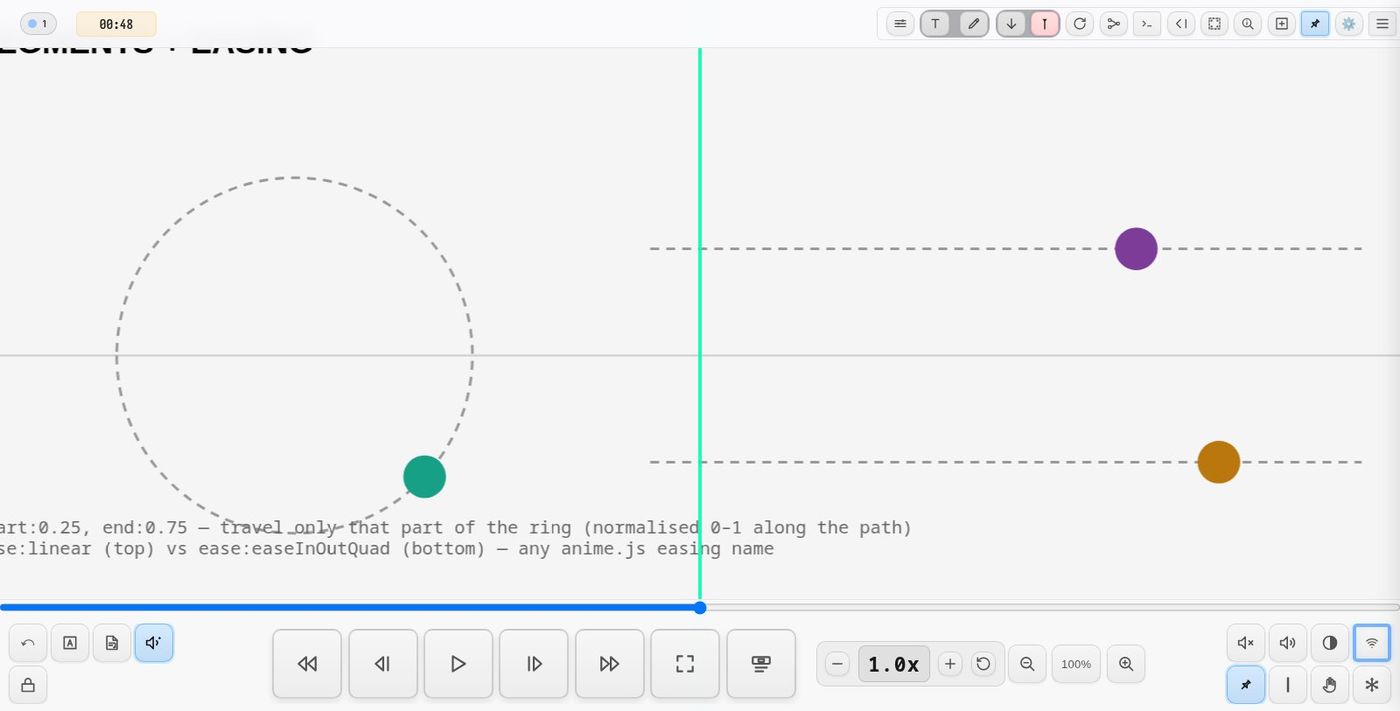
It supports path traversal, directional modes, rotation modes, looping, OSC output, partial-path motion, trigger-based activation, delayed start, visual pre-start states, interactive touch/drag control, grouped fader presets with launcher bars, pause-drag repositioning (spatial scores), live console hot-reload, and multi-client sync.
BASIC FORM
o2p(path:<id>, dur:<beats>, mode:fwd)
Required:
| Key | Meaning |
|---|---|
path |
The ID of the <path> element to follow |
TIMING
dur:<beats>
Duration of one full traversal of the path.
o2p(path:orbit, dur:6)
In mode:alt, the full A→B→A cycle lasts dur beats.
tdelay:<beats>
Delays the start of the animation after the cue triggers.
o2p(path:orbit, tdelay:3)
tdelay is in beats, independent of score position.
SPEED PROFILE — at: and dur:[…]
dur: times one traversal — one pass of the path, which is a lap where the
path is closed and a run from end to end where it is a line or an arc. One
number is one speed for that whole pass. When the movement has to be uneven —
setting off from rest, covering one part of the path faster than another, each
pass quicker than the last — cut the traversal into stretches and give each
one its own beats and its own curve.
at:[t1, t2, …]   where the traversal is cut. Absolute normalized positions on
                 the path (the same space as start: and end:); 0 and 1 are
                 implied, so at:[0.25, 0.5, 0.75] makes four stretches.
dur:[…]          BEATS PER STRETCH. A list here is what turns the profile on.
ease:[…]         one curve per stretch, indexed the same way.
Entries are picked by (pass * segments + segment) % list.length, so they carry
on from one traversal to the next instead of restarting: twelve dur entries
over four stretches prescribe three different passes, then repeat. A shorter
list cycles, the way trans()'s per-leg lists do.
Three passes of a path cut into quarters, setting off from rest and gaining speed pass by pass:
o2p(uid:m1, path:ring, start:0, trig:auto, loop:3,
    at:[0.25, 0.5, 0.75],
    dur:[8, 4, 3.2, 3.4,   2.8, 3.2, 2.8, 3.2,   2.5, 2.9, 2.5, 2.9],
    ease:[easeInQuad, linear, linear, linear,
          linear, linear, linear, linear,
          linear, linear, linear, linear])
18.6 beats for the first pass, 12 for the second, 10.8 for the third. The
stretches need not be equal: at:[0.18, 0.5, 0.68] gives two short ones and two
long ones, which is how a profile follows the shape of the path it is drawn on.
The splits belong to the path, not to the object. They are absolute
positions, so several objects on one path all change speed at the same places,
wherever each is drawn. An object starting mid-stretch covers a partial stretch
at each end of its traversal, and the two partials share that stretch's beats
between them: every object's traversal takes the prescribed time, wherever it
starts. Give them all the same at:/dur:/ease:, and stagger their
entrances with tdelay:.
Writing speed rather than counting it
An easing sets the speed at the ends of its stretch, and two stretches meet cleanly only when the first one's exit speed equals the second one's entry speed. As multiples of the stretch's own mean speed:
| easing | entry | exit |
|---|---|---|
linear |
1 | 1 |
easeInQuad / easeInCubic / in(p) |
0 | 2 / 3 / p |
easeOutQuad / easeOutCubic / out(p) |
2 / 3 / p | 0 |
easeInOutQuad, easeInOutSine, … |
0 | 0 |
So the in-curves are for leaving a standstill, the out-curves for arriving at
one, and everything between them is linear. An easeInOut stretch stops
dead at both ends — a profile with one in the middle is an object that halts
at every split, which is rarely what "varied speed" meant.
- Inside a
linearstretch the speed is constant, and it jumps at each split. That jump is the point: one stretch covered faster than the next reads as a change of pace, not a glide. - Leaving from rest is one in-curve. An
easeInQuadstretch exits at twice its own mean speed, so it hands over smoothly when the next stretch'sduris(span_next / span_first) × dur_first ÷ 2— that is the8 → 4above. Generally: give an eased stretchdur = span ÷ (running speed) × slope. - Start on a split when the profile uses eased stretches. An easing belongs
to its segment, so an object that starts mid-segment covers that segment in
two partial legs — at the beginning and the end of its traversal — and both
carry the easing. A profile that sets off from rest, read that way, brings the
object to a halt just before each traversal ends and accelerates it again.
start:0, or any value listed inat:, avoids it;start:autois fine for a profile oflinearstretches. easeBackandeaseElasticovershoot past the end of their stretch and will visibly jerk the object across a split. Keep to the linear/sine/quad family inside a profile.- Watch it rather than trust it:
follow(<uid>.tvel, …)on adisplay()reads out path lengths per second, so the profile can be read off the screen while it runs.
A profile covers a whole traversal in one direction, so at:/dur:[…] need
mode:forward and no end: sub-range; they say so in the console when they do
not get them, rather than quietly using the first number. With no at: at all,
dur:[12, 9, 7] is simply one duration per traversal — three passes, each
faster than the last.
SPEED CONTROL
bipolar:1
Enables bipolar speed mode for duration-bound animations. This transforms the speed fader from unipolar (slow→fast) to bipolar (reverse→stop→forward).
| Fader Position | Speed Effect |
|---|---|
| Left (0) | Maximum reverse speed (anticlockwise) |
| Center (0.5) | Stopped |
| Right (1) | Maximum forward speed (clockwise) |
o2p(path:orbit, dur: follow(fader1.t, 0.1, 4), bipolar:1)
Use Cases:
- Bidirectional path animation with intuitive center-stop behavior
- Orbiting objects that can reverse direction
- Scratch/scrub-style controls for media
Without bipolar (default), the speed fader is unipolar:
- Left = slowest speed
- Right = fastest speed
- No reverse motion possible
INITIAL VISIBILITY
init:
Controls how the object looks before the animation begins.
| Value | Effect |
|---|---|
show |
Visible immediately (default) |
hide |
Hidden until triggered |
ghost |
Semi-transparent (30% opacity), no interaction |
fadein(beats) |
Fade in over that many beats |
armed |
Ghost opacity (0.7), click to start animation |
armed(opacity) |
Custom ghost opacity, click to start |
armed(opacity, fade) |
Custom opacity and fade duration, click to start |
The object is positioned at its correct starting location before motion begins.
o2p(path:orbit, tdelay:4, init:hide)
o2p(path:ring, dur:8, init:fadein(2), trig:playhead)
o2p(path:spiral, dur:12, init:armed(0.3))
DIRECTION MODES
| Mode | Meaning |
|---|---|
forward / fwd |
0 → 1 along path |
reverse / rev |
1 → 0 |
alternate / alt |
back-and-forth motion |
o2p(path:curve, mode:alt, dur:8)
Alternate and path shape
Alternate mode is path-shape-aware:
- Closed paths (circles, orbits — SVG paths ending with
Z): each direction wraps around the full loop.start:0.5means the object enters at the midpoint and orbits the full circle before reversing. - Open paths (lines, arcs): the object bounces between
startandendpositions. No wrapping.
PAUSE-DRAG REPOSITIONING
drag:1
Enables free drag repositioning when an armed animation is paused. Default is off.
o2p(path:orbit, dur:10, init:armed, drag:1)
Without drag (default): click pauses the animation in place, click again resumes
from the same position. Standard behaviour for musical scores.
With drag:1: click pauses, then the object can be dragged freely off the path.
On resume, the object snaps to the nearest point on the path and continues from there.
The original path range (start/end) is preserved — only the first cycle after drag
starts from the new position; subsequent cycles use the full original range.
This is designed for spatial audio scores where a performer repositions a sound source during a pause, then resumes the trajectory from the new location. While it is dragged, a spatial o2p keeps sending where it is.
o2p(path:traj_spiral, uid:src1, dur:25, drag:1,
    spatial:dome, bounds:dome_bounds, osc:1)
PATH SEGMENTS
o2p(path:ring, start:0.2, end:0.8)
The object travels only between normalized positions start and end.
o2p(path:ring, start:auto)
start:auto begins at the point of the path nearest to where the object is placed in the SVG — useful on closed paths, where the path's first node is otherwise an arbitrary starting point. Motion still follows the path's drawing direction (mode:reverse flips it).
ROTATION
rotate: |
Description |
|---|---|
none |
no rotation |
aligned |
align to tangent direction |
locked |
fixed heading using rotlock |
spin |
continuous rotation (rotspeed, rotdir) |
Additional keys:
| Key | Meaning |
|---|---|
rotoffset |
add angular offset |
rotlock |
fixed heading in degrees |
rotspeed |
seconds per full rotation |
rotdir |
±1 direction multiplier |
LOOPING
o2p(path:orbit, loop:3)
o2p(path:orbit, loop:0)   // infinite
o2p(path:curve, loop:1, freeze:1)   // A→B once, stop at B

By default a finished bounded loop snaps the object back to its start
position. Add `freeze:1` (or `fill:freeze`) to rest at the **end** of the
path instead — travel from A to B and stay at B.
A bounded run publishes <uid>.end on the parameter bus: 0 as it starts,
1 when it finishes. Anything can wait for it — a map-mode station
(station(until:"buoy.end"), see stations) or
any cue with a condition trigger (trig:"buoy.end").
OSC OUTPUT
o2p(path:orbit, osc:true)
Emits:
/o2p/<uid> <pathT> <normX> <normY> <angle>
Custom OSC address:
o2p(path:orbit, osc:true, oscAddr:myController)
Emits:
/myController <pathT> <normX> <normY> <angle>
TRIGGERING
| Trigger | Behavior |
|---|---|
trig:auto |
starts automatically in page mode |
trig:edge |
starts when the playhead intersects in scroll mode |
trig:touch |
no auto-animation; object is draggable along path |
Cues may also be activated programmatically.
tdelay applies after the trigger is detected.
TOUCH MODE (Interactive Control)
The trig:touch mode transforms the o2p animation into an interactive controller.
Instead of automatically animating, the object waits for user interaction.
o2p(path:fader, trig:touch, osc:true)
Behavior:
- Object is positioned at the start point (or
start:position) - No automatic animation occurs
- User can grab and drag the hit-label overlay
- Object follows the user's finger/mouse along the path
- If
osc:true, every movement emits OSC values
Use Cases:
- Browser-based OSC faders/sliders
- XY pads with constrained motion
- Rotary knobs (using circular paths)
- Custom UI controllers that follow any SVG path shape
Example — Linear Fader:
o2p(path:verticalLine, trig:touch, osc:true, oscAddr:fader1)
Example — Circular Knob:
o2p(path:knobArc, trig:touch, start:0.1, end:0.9, osc:true, oscAddr:knob1)
Visual Indicator: Touch mode objects display an orange hit-label ring (instead of purple) to indicate they are draggable.
Moved by cues and by OSC: ui(uid:<fader>, value:…) and step: move a
touch fader as if dragged (see ui()),
and so does OSC arriving at /<uid>/t (say an expression pedal): the handle
moves on every client, and the sync leader shares the value with clients that
join later.
Grabbing a running motion — scrub:1: the other way round from a
touch fader: the motion runs by itself, and a press-and-drag on the object
takes hold of it like tape under a finger. It moves along its path by the
drag's component along the path, is held still while held (on every client),
and carries on from where it is let go. A tap without a drag runs tap:.
With scrub:flip a drag against the way the motion runs also turns it round
on release: the bipolar fader its speed follows goes to 1−t, as
ui(uid:…, value:flip) would.
o2p(path:lane1, uid:L1, dur:follow(spd1.t, 120, 30), bipolar:1, loop:0,
    trig:auto, hit:0, scrub:flip, tap:"ui(uid:spd1, value:hold)")
Who may drag it: allow:[names], optionally with lock:"cond", limits
who may drag (or double-tap) the fader — see
ui().
LIVE RE-RUN
Run from the live console, an o2p() that is
already running is not restarted: it carries on from where its object is,
with the new parameters. Re-run with trig:touch and it stops there as a
touch fader; re-run without it and the fader sets off from where it was left;
loop:1 runs it out from where it is. Playhead and button re-triggers in a
score still restart from start:.
path: may name a group around the geometry, such as a line made with
shape(sides:1).
FADER GROUPS AND PRESETS
Touch-mode faders can be collected into named groups. A group enables saving and recalling all fader positions as named presets, tweening between presets with easing, and sequencing preset recalls over time.
Grouping Faders
Add group:<name> and uid:<id> to each touch-mode fader:
o2p(path:track1, trig:touch, group:mixer1, uid:vol, osc:true)
o2p(path:track2, trig:touch, group:mixer1, uid:pan, osc:true)
o2p(path:track3, trig:touch, group:mixer1, uid:send, osc:true)
All three faders register under window._o2pTouchGroups["mixer1"] and can be
saved/recalled as a unit. The group value is freeform — any string.
Launcher Bar
When a group registers, a launcher bar appears below the group's bounding box. It provides direct access to presets and sequences without opening the full preset panel.
The launcher includes:
- Preset/Sequence slots — left-click to recall, long-press to store current positions
- Bank navigation — arrow buttons to page through banks of slots
- Mode toggle (P/S) — switch between preset and sequence slot modes
- Tween toggle (~) — smooth interpolation or instant jump on recall
- Sequence transport — play/stop buttons for sequence playback
- Settings gear — opens the full o2p Preset Manager panel
An orange toggle circle appears to the right of the group. Click it to show or hide the launcher bar.
Preset Manager Panel
The preset panel (keyboard shortcut Alt+Shift+O, or gear button on launcher) provides full preset management:
- Presets tab — save, recall, delete named presets with tween duration and easing
- Sequences tab — define ordered lists of presets with per-step timing
- Import/Export — save and load preset collections as JSON files
Console access: window.o2pPresetUI.toggle()
Preset Data
Each preset stores the normalized position of every fader in the group:
{
  "mixer1": {
    "vol": { "t": 0.75 },
    "pan": { "t": 0.3 },
    "send": { "t": 0.5 }
  }
}
If a fader has a rotation handle (hmode:), a p value is also stored:
{ "vol": { "t": 0.75, "p": 0.6 } }
Console API
window.o2pPresets.save("intro")           // save current positions
window.o2pPresets.recall("intro")         // instant recall
window.o2pPresets.recall("intro", { dur: 2, ease: "easeInOutSine" })  // tween
window.o2pPresets.list()                  // list all preset names
window.o2pPresets.delete("intro")         // delete a preset

// Sequences
window.o2pPresets.defineSequence("drift", [
  { preset: "intro", dur: 3 },
  { preset: "verse", dur: 2 },
  { preset: "chorus", dur: 4 }
], { loop: true })
window.o2pPresets.playSequence("drift")
window.o2pPresets.stopSequence()
ROTATION HANDLES
Touch-mode faders can have a secondary rotation handle that adds a second control dimension. This is useful for parameters like pan, filter cutoff, or any value that benefits from a rotary control alongside the linear fader.
hmode:<continuous|limited>
Determines the rotation behavior:
continuous— full 360-degree rotation with wraparound (suitable for azimuth, phase)limited— constrained arc with hard stops like a physical potentiometer (suitable for volume, gain)
rotrange:<degrees>
Sets the arc range for hmode:limited. Default is 270 degrees.
o2p(path:track1, trig:touch, group:mixer1, uid:vol, hmode:limited, rotrange:270, osc:true)
handle:<elementId>
Reference a user-drawn SVG element as the rotation handle instead of the auto-generated one:
o2p(path:track1, trig:touch, group:mixer1, uid:vol, hmode:limited, handle:knob1, osc:true)
Where knob1 is the ID of an existing SVG element in the score.
TARGET BUTTONS
Click-type o2p elements can control other faders in the same group using the
target parameter. This allows creating buttons that set specific fader
positions — useful for presets, mute/unmute toggles, or recall buttons.
Basic Target Button
Use target:<faderId> and targetT:<value> to create a button that sets
a fader to a specific position when clicked:
o2p(path:btnPath, trig:click, group:mixer1, target:vol, targetT:0.8)
When clicked, this sets the vol fader in mixer1 to t=0.8.
Toggle Button
Use toggle:<val1>,<val2> to alternate between two positions on each click:
o2p(path:btnPath, trig:click, group:mixer1, target:vol, toggle:0,0.8)
First click sets vol to t=0.8, second click sets it to t=0, and so on.
Example: Mute/Unity Buttons for a Mixer
<!-- Fader paths -->
<path id="track0" d="M 0,120 L 0,0" />
<path id="track1" d="M 30,120 L 30,0" />

<!-- Faders -->
<rect id="in0" data-oscilla="o2p(path:track0, trig:touch, group:mixer, uid:in0, osc:1)" ... />
<rect id="in1" data-oscilla="o2p(path:track1, trig:touch, group:mixer, uid:in1, osc:1)" ... />

<!-- Toggle button paths (minimal) -->
<path id="btn0" d="M 0,130 L 0,131" style="stroke:none" />
<path id="btn1" d="M 30,130 L 30,131" style="stroke:none" />

<!-- Toggle buttons: click to toggle fader between mute and 0dB -->
<rect id="mute0" data-oscilla="o2p(path:btn0, trig:click, group:mixer, target:in0, toggle:0,0.8, osc:1)" ... />
<rect id="mute1" data-oscilla="o2p(path:btn1, trig:click, group:mixer, target:in1, toggle:0,0.8, osc:1)" ... />
Two kinds of id are in play here and the difference matters. track0 and
btn0 are plain ids because something points at them — path: resolves an
element by id. The cues themselves live in data-oscilla, with the id left as
the uid: other cues address them by (target:in0).
The toggle values 0,0.8 correspond to:
t=0— bottom of fader (mute)t=0.8— 80% position (0dB / unity gain with standard dB scaling)
Parameters
| Parameter | Description |
|---|---|
target:<id> |
The uid of the fader to control (must be in same group) |
targetT:<value> |
Set fader to this t value (0-1) on click |
toggle:<v1>,<v2> |
Alternate between two t values on each click |
Note: target requires group to be set. The target fader must also be
registered in the same group.
TOGGLE STATES (Interactive Claiming)
Toggle states provide an interactive claiming mechanism independent of OSC output. Performers can double-click to cycle through named states, with visual feedback and optional callbacks. This is useful for instrument assignment, ownership indication, or any multi-state interaction.
Basic Syntax
o2p(path:orbit, dur:10, toggleStates:[idle, claimed])
Parameters
| Key | Description |
|---|---|
toggleStates |
Array of state names to cycle through on double-click |
toggleColors |
Optional array of colors per state. Use #client for claiming client's color |
onToggle |
Cue expression to execute when state changes |
Toggle Colors
Define colors for each state:
o2p(path:orbit, dur:10,
    toggleStates:[idle, claimed],
    toggleColors:[default, #client])
| Color Value | Effect |
|---|---|
default |
Use the default overlay color |
#client |
Use the claiming client's assigned color |
#ff0000 |
Any hex color |
onToggle Callback
Execute a cue expression when the state changes. Supports variable substitution:
| Variable | Value |
|---|---|
$uid |
Animation UID |
$state |
New state index (0-based) |
$stateName |
New state name |
$clientIndex |
Client's 1-based index in playbackClientNames preference |
o2p(path:orbit, dur:10, uid:src1,
    toggleStates:[idle, claimed],
    toggleColors:[default, #client],
    onToggle:"osc(addr:/source/claim, uid:$uid, state:$state, client:$clientIndex)")
Stopping: off:1
o2p(off:1) on the same element stops it where it is and takes it down: no touch handle and no fader are left, and its t keeps the last value. To hold it as a fader instead, run the o2p again with trig:touch. In the live console Ctrl+Shift+. on the line does this.
State Persistence
Toggle states are:
- Persisted to localStorage per client
- Synced across all connected clients via WebSocket
- Restored on page reload
Independence from OSC
Toggle states are independent from osc:1. Having toggleStates does not
affect continuous OSC output. You can have claiming UI without OSC, OSC without
claiming, or both together.
LIVE CONSOLE EDITING
Running o2p animations can be modified in real time from the live console. Pick an element, edit DSL parameters in the editor, and evaluate.
What happens:
- If the animation is running, it restarts from its current position with
the new parameters (e.g. changed
dur,mode,ease). The transition is seamless — no stop/start needed. - If the animation is paused, the new parameters are stored and take effect when the performer clicks to resume.
- If the parameters haven't changed (e.g. playhead re-trigger), nothing happens.
Editable parameters: dur, loop, mode, ease, start, end, osc, oscAddr
Identity parameters (path, uid, init) cannot be changed mid-flight.
MULTI-CLIENT SYNC
Armed animations sync across connected clients via WebSocket:
- Start (armed → running): all clients start simultaneously
- Pause (running → paused): all clients pause
- Resume (paused → running): all clients resume, including drag position
With drag:1, the resume position is transmitted so remote clients restart
from the same path location.
Limitation: late-joining clients see armed elements but do not auto-start running animations. A connected client must stop and restart to bring late joiners into sync.
LIVE UPDATE (uid:)
o2p(path:ring, uid:a1)
o2p(uid:a1, mode:alt)
Later cues with the same uid modify running animations.
FULL PARAMETER LIST
| Key | Description |
|---|---|
path |
required path reference |
dur |
motion duration — or a list of beats per stretch, with at: |
at |
split points that cut a traversal into stretches |
mode |
direction mode |
loop |
repeat count (0 = infinite) |
start, end |
normalized path range |
rotate |
rotation behavior |
rotoffset, rotlock, rotspeed, rotdir |
rotation parameters |
ease |
easing preset, a parameterised one (in(1.05)), or a list |
osc |
OSC emission |
oscAddr |
custom OSC address (without leading /) |
uid |
animation identity tag |
trig |
trigger mode (auto, edge, touch) |
tdelay |
time delay after trigger |
init |
initial visibility: show/hide/ghost/armed |
drag |
enable pause-drag repositioning (default: off) |
bipolar |
bipolar speed mode: center=stop, left=reverse, right=forward (default: off) |
anchor |
the point of the object that rides the path: the centre of its bounding box (default), origin — its own (0,0) — or [x, y] in its own coordinates. A fixed point does not move as the drawing grows, so a path can be placed exactly: anchor:origin on a group with transform="translate(x,y)" puts that corner on the path |
hit |
hit:0: no hit label, so nothing on the object takes clicks — for a motion nobody clicks, especially a large one, whose label (sized to the object) would cover the controls around it (default: on) |
scrub |
scrub:1: press on the moving object and drag it along its path — it follows the pointer (the drag along the path's direction), is held while held, and carries on at its speed from where it is let go; every client sees it. scrub:flip also reverses a bipolar-speed motion (at the same speed) when it is dragged against the way it runs. allow:/lock: apply (default: off) |
tap |
with scrub:1, a cue to run on a press without a drag: tap:"ui(uid:spd1, value:hold)" |
spatial |
the object is a sound source: plan or dome. Its position on the bounds circle is sent as azimuth / elevation / distance to /oscilla/spat/<uid> instead of its usual values (Spatialisation) |
bounds |
id of the element that is the room (a circle, an ellipse or any shape's box) |
format |
what a spatial o2p sends: aed (default), ae, ad, xyz, aedg, raw |
elev |
a spatial o2p in plan mode: its height in degrees (default 0, ear level) |
group |
fader group name (touch mode only) |
hmode |
rotation handle mode: continuous or limited (touch mode only) |
rotrange |
arc range in degrees for hmode:limited (default 270) |
handle |
ID of user-drawn SVG element to use as rotation handle |
launcher |
show launcher bar for group (default: true, set false to suppress) |
toggleStates |
array of state names for double-click cycling |
toggleColors |
array of colors per state (#client for client color) |
onToggle |
cue expression executed on state change |
EXAMPLES
o2p(path:orbitA, dur:8, tdelay:3, init:hide)
o2p(path:spiral, rotate:aligned, rotoffset:-90)
o2p(path:ring, start:0.2, end:0.9, mode:alt)
o2p(path:circle, rotate:spin, rotspeed:2, rotdir:-1)

// Touch mode controllers
o2p(path:faderTrack, trig:touch, osc:true, oscAddr:volume)
o2p(path:knobPath, trig:touch, start:0.15, end:0.85, osc:true)

// Grouped faders with preset system
o2p(path:track1, trig:touch, group:mixer1, uid:vol, osc:true)
o2p(path:track2, trig:touch, group:mixer1, uid:pan, osc:true)
o2p(path:track3, trig:touch, group:mixer1, uid:send, osc:true)

// Grouped fader with rotation handle
o2p(path:track1, trig:touch, group:mixer1, uid:vol, hmode:limited, rotrange:270, osc:true)

// Grouped fader with user-drawn rotation handle
o2p(path:track1, trig:touch, group:mixer1, uid:vol, hmode:continuous, handle:knob1, osc:true)

// Spatial source with pause-drag repositioning
o2p(path:traj_spiral, uid:src1, dur:25, mode:fwd, ease:linear,
    drag:1, spatial:dome, bounds:dome_bounds, osc:1)

// Armed alternate without drag (standard score)
o2p(path:path2, mode:alt, dur:5, loop:0, ease:linear, init:armed)

// Bipolar speed control (center=stop, left=reverse, right=forward)
o2p(path:orbit, dur: follow(speedFader.t, 0.5, 8), bipolar:1, loop:0)
What an o2p publishes
An o2p() is the workhorse source of the control plane — a dot on a path is a
fader, a curve reader, a position:
| Channel | Meaning |
|---|---|
t |
how far along the path, 0–1 |
x |
x position within the path's box, 0–1 |
y |
y position, 0–1 |
angle |
heading, in degrees |
p |
rotation handle, 0–1 (only with hmode) |
It takes dur: and rotspeed: as follow() inlets, and being a mover it can also
fire a cue it passes over with trig:<uid>.
o2p(path:pFader, trig:touch, uid:fx)
synth(uid:pad, wave:sine, freq: follow(fx.t, 90, 2000), amp:0.1)
Open the connections view to see these as ports, and demo-connections for a worked
example.
Demo project
See demo-o2p: travel once vs freeze:1, fwd/rev/alt loops, aligned and spinning rotation on curves, segments, easing, speed profiles, init prestates, and a touch fader streaming OSC.
Section H is the profile: two objects share one ring and both take 6 beats a pass, but one holds a constant speed while the other is cut into quarters by at: and timed dur:[1, 2, 1, 2] — so they part company between the ticks and meet again on every one of them, with a live tvel readout under each. Beside it, a line that leaves from rest and hands over to a constant speed without lurching, and one that takes a different duration on each of its three passes.
http://localhost:8001/?project=demo-o2p
Tip: use ← → or ↑ ↓ to navigate the docs