
zoom() — move the view to an object
zoom() is a camera move. It zooms the score to a level and brings an object
to the middle of the screen, smoothly, over a duration.
zoom(to:detail, scale:6, dur:4)
Over four beats the view zooms to 600% and pans until the element detail
sits in the centre.
Arguments
| Argument | Meaning |
|---|---|
to |
id or uid of the object to centre on. Left out, the point now in the middle of the screen stays there: a plain zoom. |
scale |
Zoom level, as in the zoom readout: 1 is the fitted score, 4 is 400%. Left out, the level stays: a pan only. |
dur |
Beats for the move. 0 jumps. Default 2. |
ease |
easeInOutSine (default), easeInOutCubic, easeOutCubic or linear. |
next |
A cue to run when the move ends — see Chaining below. |
playhead |
follow (default): the playhead is carried along and ends on the target. <id>: it ends on that element instead. stay: the view moves alone and the playhead keeps its time. |
edge |
<id>: arrive with the playhead line in the middle of the screen and this element just to its right (margin: score units, default 12), so the playhead then plays through all of it. The view centres on the playhead (and vertically on the target). If the target is held by a pin(), the held material slides along into place, is let go on arrival so the score carries it through the playhead, and is taken hold of again once its right edge has passed. |
align |
With edge: center puts the element's centre on the playhead instead of its left edge — e.g. a star dead centre with the line through it. |
sweep |
With edge on a pinned target: 0 keeps it pinned on arrival (no pass through the playhead). |
home |
home:1 goes back to the normal view: zoom 1 (or scale:), the playhead where it sat before the first zoom() moved it, no pan. |
hold |
Beats the camera stays locked on the target after arriving, or next to hold until another zoom() starts. Wherever the target is carried — a turning sky, a playhead that plays on — it is kept where it landed on screen (a pinned map slides, the view pans). On a turning sky this looks as if the sky pivoted on the target. With edge on a pinned target the sweep through the playhead waits until the hold runs out. A rewind, another zoom or taking the view by hand ends it. |
at |
[x, y]: where on the screen the target ends, as fractions of the view. [0.5, 0.5] (the default) is dead centre, like width/2, height/2 in Processing; [0.25, 0.5] is a quarter in from the left. With edge, the playhead line ends at x. |
delay |
Beats to wait before the move starts — e.g. chained together with a ui() reveal, to let it fade in first. |
trig: and uid: work as on every cue; by default the playhead fires it.
trig:auto sets the opening view once the project has loaded; trig:manual
keeps it off the playhead so only a next: (or a button) starts it.
Landing exactly
The move follows its target the whole way, but a turning sky, a pinned map
sliding into place or a playhead that plays on can all leave it a little out
at the end. So on arrival zoom() measures the target on screen once more and
puts it exactly at at: (and, with edge, exactly on the playhead line). If
the correction was more than a pixel, the console says by how much:
[zoom] arrived 42.0px along, 3.5px across from where it belongs — corrected.
zoom(to:markA, scale:2, dur:10, edge:markA, align:center, at:[0.5, 0.5])
markA ends dead centre with the playhead line through it.
The playhead comes along — or stays
By default the playhead travels with the view and ends on the target: the playback position moves to it, the playhead line slides to it on the screen, and when the move ends playback carries on from there. Whatever crosses the line next is what you are looking at — a star turning past it, the next marker. Cues it passes on the way are not fired: they count as passed, as after a seek.
playhead:<id> carries it to another element instead. On a turning sky the
useful place is the pole: every star of the constellation around it crosses a
line through the pole twice a turn.
playhead:stay moves the view alone. The playhead keeps its time and slides
with the score, off the screen if the object is far from it; a playing score
carries on from the new view, and markers further along the timeline still
fire when the playhead reaches them.
zoom(to:detail, scale:6, dur:4)                              // playhead ends on detail
zoom(to:figureA, scale:16, dur:8, playhead:pivotMark)        // view on the figure, playhead on the mark
zoom(to:detail, scale:6, dur:4, playhead:stay)               // view only
zoom(home:1) puts the playhead line back where it sat on the screen before.
The zoom and pan are local view settings, like the toolbar zoom: every client that runs the cue makes the same move on its own screen, and a reload returns to the view you had saved.
The object is followed during the move, so something that is itself moving — a star on a rotating sky, material in a score that is playing — still ends up centred.
Chaining
A cue that knows when it has finished can hand over to the next with next:.
text() and zoom() do:
text(reveal:notes.txt, target:self, next:"zoom(to:detail, scale:6, dur:4)")
zoom(to:detail, scale:6, dur:4, next:"zoom(to:overview, scale:1, dur:8)")
The value is either
- a cue expression in quotes (the parser does not take a bare cue as a parameter value), run as it stands, or
- the id or uid of an element that carries a cue, which is then run with that
element as its target:
next:outro.
A text that is stopped, clicked away or replaced does not run its next.
Taking the view back — the sequence button
Chained cues (next:), delayed ones (tdelay:) and a moving zoom() together
make a sequence. While one is running a small button appears at the bottom
left: ⏸ pause sequence / ▶ resume sequence.
- Pausing holds the chain: hand-overs and delayed cues wait, and a zoom in motion stops where it is. Resume finishes that move and carries on.
- Your own navigation pauses it too — dragging the score, the wheel, the zoom buttons, a pinch — so a manual look around is never pulled away. Clicks on buttons, panels and sliders do not count.
- A rewind or reset (anything that resets the animations) stops it outright.
Playback is not affected: the playhead and the cues it fires carry on.
Demo project
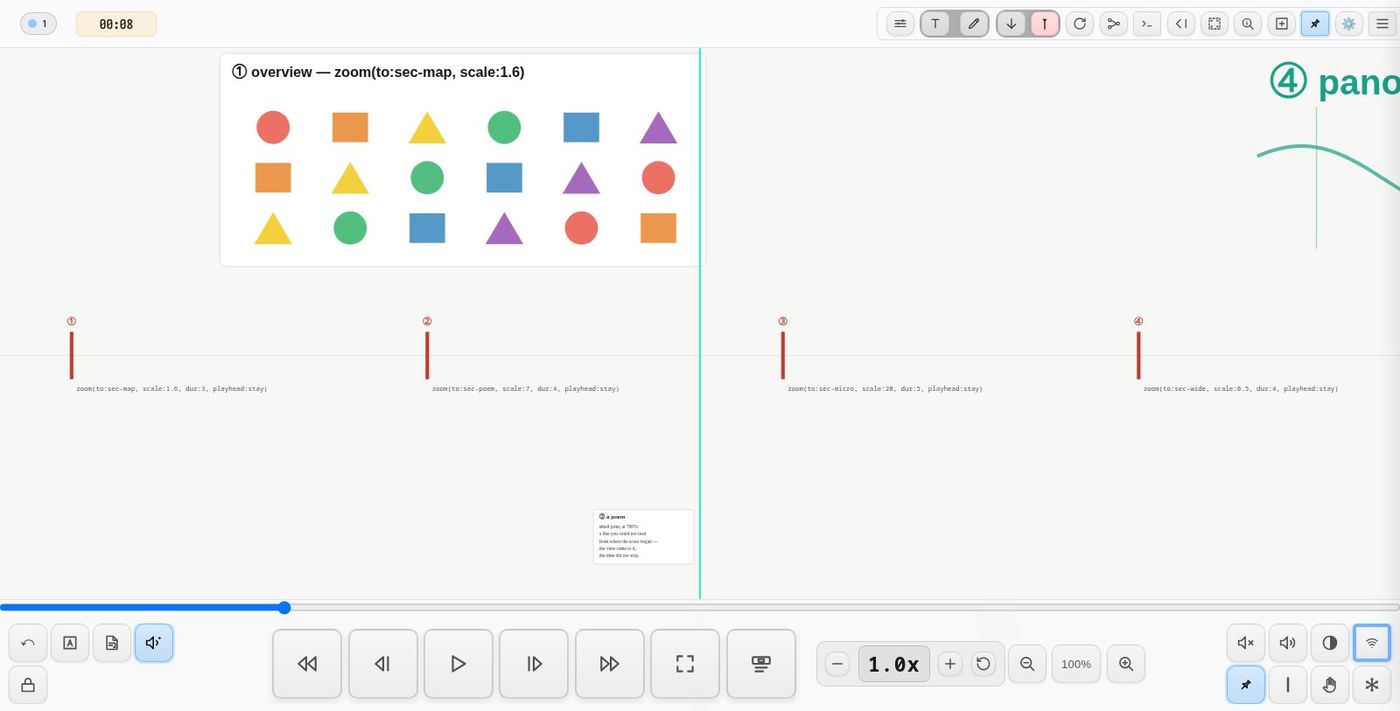
demo-zoom (Demos → Animation): press play and the playhead fires six red flags along the timeline —
zoom(to:sec-map, scale:1.6, dur:3, playhead:stay)— an overviewzoom(to:sec-poem, scale:7, dur:4, playhead:stay)— a small poem you cannot read at fitzoom(to:sec-micro, scale:20, dur:5, playhead:stay)— a spiral 34 units acrosszoom(to:sec-wide, scale:0.5, dur:4, playhead:stay)— the whole panorama, smaller than the screen- a tour of three stars chained with
next:— the default: the playhead travels with it and plays on from the last stop zoom(home:1, dur:4)— back to the normal view
①–④ leave the playhead behind so the timeline can visit each section in turn; ⑤ shows it coming along.
See also
-
Map mode, zoom() or trans()? — when a route of stations suits a piece better than zoom() cues on a timeline, and the other way round
-
text()—reveal, withnext: -
pause()—next:after a pause
Tip: use ← → or ↑ ↓ to navigate the docs