
draw() — the ink an object leaves behind
draw() does not move anything. Put it on an element that something else is
moving and the element leaves a line where it has been.
draw(color:#ffcc00, width:2)
On its own that cue does nothing at all, because nothing is taking the element anywhere. Pair it with a motion cue and the object becomes a pen:
trans(to:[wpA, wpB, wpC], dur:Prand(1, 2, 4, inf), mode:loop, trig:auto) draw(color:#ffcc00, width:2)
A random walk between waypoints, drawing as it goes: a little drawing bot. Any
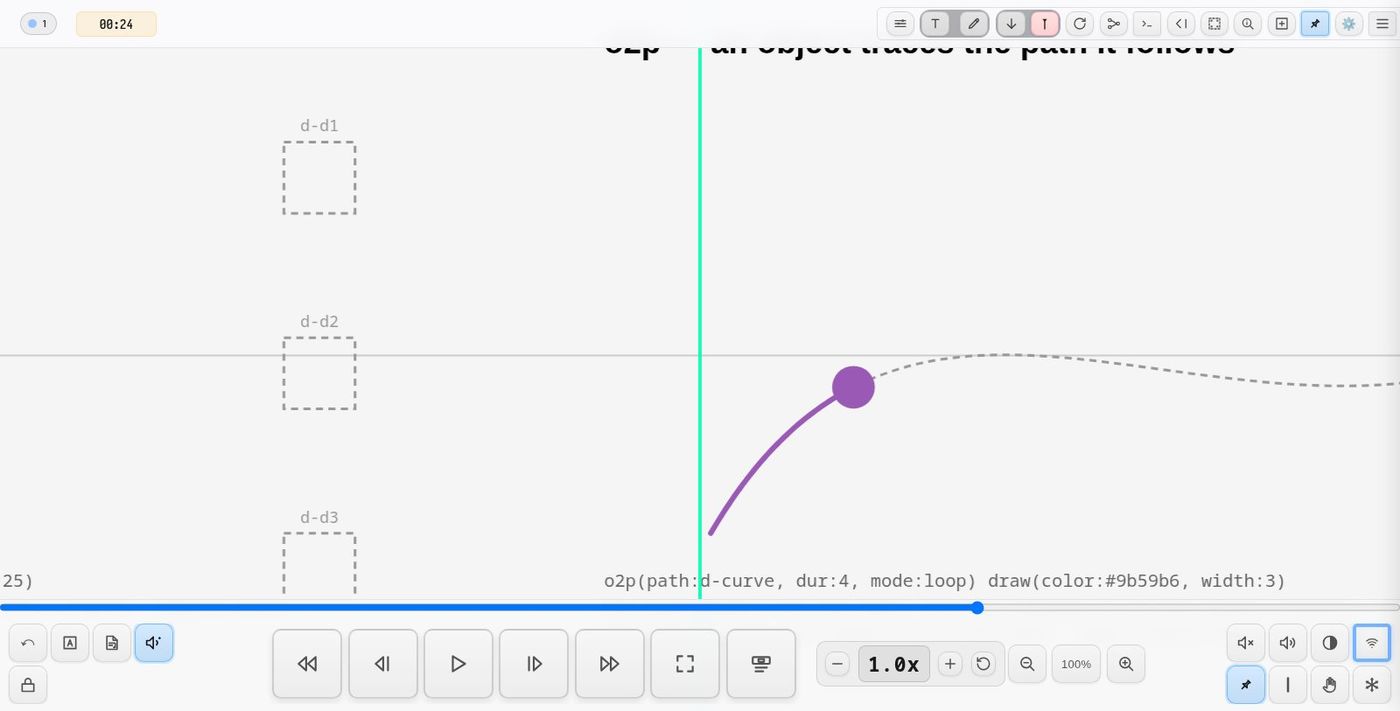
motion works the same way — o2p() along a path, rotate() around a point,
scale(), or a drag by hand.
Arguments
| Argument | Meaning |
|---|---|
color |
One colour, or a list that steps along the trail. Left out, the pen draws in the object's own stroke, or its fill. |
width |
Stroke width. One value, or a list that steps like color. |
dash |
An SVG dash pattern, e.g. dash:"8 4". |
seg |
Beats per step through a color or width list. Default 2. |
fade |
Beats for ink to fade away. Default 0, which keeps it. |
max |
Most points to keep. Past it the oldest end is dropped as the new end is drawn. Default 0, no limit. |
min |
How far the object must travel, in score units, before another point goes down. Default 1.5. |
jump |
Lift the pen over a leap this far. Left out, the pen works it out; jump:0 draws everything. |
opacity |
0 to 1. |
close |
Close the shape when the pen lifts. |
anchor |
score (default): ink stays where it was drawn. playhead: ink travels with the playhead, so as the score scrolls on the object streams a horizontal trail behind it. |
trig: and uid: work as they do on every cue. trig:auto starts the pen at
load; trig:playhead starts it when the playhead reaches the object.
Lifting the pen
An o2p in loop mode reaches the end of its path and reappears at the start.
A looping trans does the same, and so does a scrub, a rewind, or a page
opening under the object. In none of those did the object travel: it was put
somewhere. A pen that joined the two positions would draw a long straight line
across the work that is not part of anything the object did.
So the pen lifts. Nothing announces a discontinuity to it, so what it goes on is distance: a leap is far bigger than the steps the same pen has been taking. The measure follows the object as it speeds up and slows down, so an ordinary acceleration does not lift it.
Set jump:<units> to fix the distance yourself, or jump:0 to switch lifting
off and draw the journey home like anything else.
A permanent drawing, or a tail
The two useful shapes come from fade and max.
draw(color:#222, width:1.5)
Nothing is thrown away, so the object slowly fills the page with its history. This is the drawing-bot reading.
draw(color:#0ff, width:3, fade:2.5)
Ink lives two and a half beats, so the object trails a comet tail and the
page stays clean behind it. max:200 does the same thing by length instead of
by time, which is steadier when the object changes speed.
Trails behind the playhead
draw(width:0.3, anchor:playhead)
Normally the ink belongs to the score: scrolling past it changes nothing, and
only the object's own motion draws. With anchor:playhead the ink is held
relative to the playhead instead, as if the camera followed it. As the score
scrolls forward every pen streams a horizontal line behind its object — even
an object that is not moving at all — and anything the object does on top of
that (a rotation, an o2p, a trans) is drawn into the streak. When the score
stops, so does the streak. Only playback streaks: dragging or scrubbing the score,
a seek or a marker jump moves the ink along with the score like everything else.
Rewinding lifts the pen and clears the page as usual.
Starting pens from another cue
A pen with trig:manual waits. draw() written as a control starts it:
draw(start:penA, clear:1, next:"text(…)")
| Argument | Meaning |
|---|---|
start |
Start every pen whose uid begins with this. A propagate() template's pens are <uid>_0, <uid>_1 …, so the template's uid — or any stem the pens share — starts the lot. |
stop |
Lift those pens; their ink stays. |
clear |
clear:1 wipes all the ink first. clear:<prefix> wipes only the ink of pens whose uid begins with it; pens still down go on with a fresh line. |
dur |
With clear: fade the ink out over this many beats instead of wiping it at once. |
save |
save:1 writes every trail of this pass so far to drawings/trails-<date>.svg in the project (save:<name> names the file). |
next |
A cue to run afterwards, as for zoom() and text(). |
Moving on from one group to the next — lift the old pens, fade their ink out slowly, and start the new ones, all in one control:
draw(stop:penA, clear:penA, dur:8, start:penB, next:second-story)
Chained after a camera move, the drawing begins exactly when the view arrives:
zoom(to:figureA, scale:16, dur:8, next:"draw(start:penA, clear:1, next:figureA-text)")
Colours that step
A list advances one entry every seg beats and starts again at the end, so a
long trail bands through the palette:
draw(color:[#e74c3c, #27ae60, #2980b9], seg:4, width:2)
width:[1, 4] steps the same way. A single value for either one stays put.
A swarm
draw() inside a propagate() template gives every member of a cluster its
own pen, which is a great deal of drawing from one line:
propagate(trans(to:[a, b, c], dur:${1}, mode:loop, trig:auto) draw(color:#888, width:0.8, fade:4), rnd(2, 6))
Every member takes its own random duration, so the group never draws the same figure twice.
Keeping a pass — drawings/
The page only holds the ink that is on it now: a clear, a fade, max: or a
rewind throws the rest away. Every finished stroke is also kept aside, so a
whole pass of the score can be written out as one SVG for artwork, printing or
another score:
- automatically, when a pass ends — on a rewind or when the page is closed
(if it drew anything worth keeping) — as
drawings/trails-<date>.svg; - on cue, with
draw(save:1)(orsave:<name>), part-way through.
The file is cropped to the ink, in the score's own coordinates, with one
Inkscape layer per group of pens (e.g. per constellation). From the console,
oscillaDraw.saveDrawings() does the same.
Where the ink goes
Into a generated layer on top of the score, in score coordinates, so it scrolls and zooms with everything else. It is never written to a file, and rewinding clears it along with the animations that made it.
It is deliberately not the session drawing layer. Those strokes are a performer's: made by hand, owned by a name, erasable, draggable, and saved in the project's annotations file alongside the rehearsal marks. A bot drawing into that file on every playthrough would bury them.
Notes
- The pen samples where the object is once a frame, and puts a point down only
once it has moved
minscore units. A parked, paused or offscreen object costs nothing and adds nothing. - When the pen lifts, the line is simplified: the points a curve does not need are dropped, which is most of them on a straight run.
- Triggering the cue again starts a fresh line and leaves the old ink in place, so repeated passes layer up.
- Every client draws its own copy. Where the motion is deterministic they match; a motion with random durations or waypoints will differ from screen to screen, which for a drawing bot is usually the point.
Demo project
demo-draw (Demos → Animation) walks through the lot, one section per feature, each captioned with the DSL that made it:
- a mover with a pen
- no colour named, so three objects draw in their own three fills
colorandwidthlists stepping along the trailfadeas a comet tailmaxas a fixed-length snakedash,opacity, and a coarsemino2pretracing the path it follows- a random drawing bot,
dur:Prand(...)on a waypoint loop - a swarm: one
propagate()template, a pen on every member
Press play and each pen starts as the playhead reaches it. The transport's reset wipes the page and draws it all again.
See also
trans()— waypoint motion, the usual partnero2p()— follow a pathpropagate()— one template over a whole cluster
Tip: use ← → or ↑ ↓ to navigate the docs