
Spatialisation — Spatial Audio in Oscilla
Oscilla embeds spatial audio control directly into the SVG score surface. Sources move through space by following drawn paths, being dragged by performers, or both. The system converts SVG coordinates into standard spatial audio formats (AED, XYZ) and sends them via OSC to external renderers like SpatGRIS, IEM, SPAT Revolution, or SuperCollider.
No spatial logic lives in the audio engine. Oscilla controls position only — the renderer distributes gain across speakers.
Oscilla Spatialisation Scoring
CORE CONCEPT
A bounds element (circle, ellipse, or rect) defines the spatial field in the SVG score. Source markers move inside this field. Their pixel position is continuously mapped to spatial coordinates and emitted as OSC.
Two projection modes interpret the bounds differently:
Mode Center Radius means Elevation source
spatial:plan Listener Distance (0–1) P handle (external)
spatial:dome Zenith (90°) Co-elevation (90→0°) Encoded in radius
Both modes share the same azimuth convention: 0° = front (top of circle in SVG), clockwise positive. This matches IEM / SpatGRIS / SPAT Revolution.
FOUR CONTROL MODES
Oscilla provides four ways to move sources through spatial fields.
All four use the same spatialMap.js coordinate engine and publish
to the same ParamBus channels.
1. Scored trajectory — o2p(..., spatial:...)
The source follows a drawn SVG path on a timer. Fully composed, deterministic, reproducible.
o2p(path:traj_orbit, uid:src1, dur:10, loop:0, mode:forward, ease:linear, spatial:plan, bounds:plan_bounds, format:aed, osc:1, oscAddr:"/spatgris/source/1")
The source marker animates along traj_orbit at 10 seconds per
traversal, looping infinitely. At each frame, the current SVG
position is mapped through mapToSpatial() and emitted as AED.
Adding init:armed(...) promotes this to mode ④ — see below.
2. Guided drag — o2p(..., trig:touch, spatial:...)
The performer drags the source along a drawn path. Constrained to the rail, but position is live and manual.
o2p(path:traj_rail, uid:src3, trig:touch, spatial:dome, bounds:dome_bounds, format:ae, group:domeRail, osc:1, oscAddr:"/spat/source/3")
The source snaps to the nearest point on traj_rail as the
performer drags. Good for constraining movement to a specific
elevation ring or arc while leaving timing to the performer.
3. Free positioning — controlXY(..., spatial:...)
No path, no animation. The performer drags source handles freely anywhere inside the bounds. A spatial mixing surface.
controlXY(bounds:dome_bounds, uid:domeMixer, touchpt:[h_src4, h_src5, h_src6], spatial:dome, format:aed, osc:1, oscAddr:"/iem/source", label:true)
Each touchpoint element becomes a draggable spatial source. Multiple handles create a multi-source spatial mixer embedded in the score.
4. Scored trajectory with free interludes — o2p(..., init:armed(...))
A hybrid of modes 1 and 3. The source follows a scored path, but
when the performer clicks to pause, it detaches from the path and
becomes freely draggable — like a controlXY handle. During the
paused-free phase, the source publishes to both spatial: and
controlXY: ParamBus channels, making it targetable by the
controlXY preset and sequence system.
o2p(path:traj_spiral, uid:src1, dur:25, loop:0, mode:forward, ease:linear, init:armed(0.7, 18), spatial:dome, bounds:dome_bounds, format:aed, osc:1, oscAddr:"/iem/source/1")
The compositional workflow:
1. Path animation runs (scored trajectory) 2. Performer clicks → source pauses, enters free drag 3. Preset sequence plays (composed free gestures) ui(action:'controlXYRecall', preset:'front_left', dur:2) 4. Performer clicks → source snaps to nearest path t, resumes
The path provides large-scale spatial structure. The preset sequences provide detailed gestural moments at breakpoints. This collapses the divide between composed trajectory and live mixing.
The workflow can be driven entirely from the
live console — pause a source, tween it through
preset positions via DSL commands, then resume. The signal monitor
shows controlXY:<uid> channels appearing when the source enters
the paused-free phase and disappearing on resume.
The init:armed(...) parameter is required — the armed lifecycle
provides the click-to-pause/resume mechanism. Without it, the
source has no way to enter the free phase.
Oscilla OSC controller design in Inkscape
PROJECTION MODES
spatial:plan — Top-down listener-centered
Used for flat speaker arrays: stereo, quad, 5.1, 7.1, ring layouts.
┌────────────────────────────────┐
│         FRONT (0°)             │
│              ·                 │
│           ·     ·              │
│        ·    L      ·    ← Listener at center
│           ·     ·              │
│              ·                 │
│         REAR (180°)            │
└────────────────────────────────┘
Center = listener position
Radius = distance from listener (0 at center, 1 at edge)
Elevation = P handle (0→-90°, 0.5→0° horizon, 1→+90°)
A source near the center is close to the listener (loud, dry). A source near the edge is far away (quiet, wet if cross-cued to reverb).
In plan mode, elevation requires the P handle (hmode:continuous).
Without it, elevation defaults to 0° (horizon).
spatial:dome — Polar azimuthal projection
Used for hemisphere and dome arrays: 8ch cube, IEM CUBE, Atmos, any speaker layout with height.
┌────────────────────────────────┐
│         FRONT (0°)             │
│              ·                 │
│           ·     ·  ← horizon  │
│        ·    45°    ·           │
│           · zen ·              │
│              ·     ← zenith   │
│         REAR (180°)            │
└────────────────────────────────┘
Center = zenith (90° directly above)
Edge   = horizon (0° ear level)
Radius = co-elevation (0 at center = 90°, 1 at edge = 0°)
Distance = 1.0 (constant — dome speakers are equidistant)
A path spiraling inward is a source rising toward the zenith. A path on the outer ring is a source moving at ear level. A path crossing through the center passes directly overhead.
No P handle needed — elevation is encoded in the radial position. Distance is fixed at 1.0 because dome speakers are all roughly the same distance from the listener. The renderer handles gain distribution from direction alone.
DSL PARAMETERS
For o2p (scored and guided)
Key Value Notes
spatial plan or dome Selects projection mode
bounds element ID Circle/ellipse/rect defining the spatial field
format aed ae xyz ad spacemap raw OSC output format
osc 1 (or throttle ms) Enable OSC emission
oscAddr "/path/to/addr" Must be quoted in SVG id attributes
hmode continuous Enables P handle for elevation (plan mode)
All other o2p parameters work unchanged: path, dur, loop, mode,
ease, init, trig, uid, group, start, rotate, etc.
For controlXY (free positioning)
Key Value Notes
spatial plan or dome Selects projection mode
bounds element ID Same element used for XY clamping
format aed ae xyz ad spacemap raw OSC output format
touchpt [h1, h2, ...] SVG element IDs for draggable handles
osc 1 (or throttle ms) Enable OSC emission
oscAddr "/path/to/addr" Base address; multi-handle appends /handleId
label true Show spatial readout overlay
uid identifier ParamBus namespace
All other controlXY parameters work unchanged: handle (rotation),
hmode, launcher, banks, rotRange, etc.
OSC OUTPUT FORMATS
format: selects how spatial coordinates are packed into OSC arguments.
Format Arguments Target renderers
aed [azi, elev, dist] IEM, SPAT Revolution, SpatGRIS
xyz [x, y, z] ICST Ambisonics, generic cartesian
ad [azi, dist] 2D panning (PanAz), no elevation
ae [azi, elev] Dome arrays (no distance needed)
aedg [azi, elev, dist, gain] Renderers expecting explicit gain
spacemap [x, y] Meyer Spacemap Go
raw [aziNorm, elevNorm, distNorm] All 0–1 for custom routing
Format selection guide
Use aed for most setups — it is the most widely supported format.
Use ae for dome arrays where all speakers are equidistant (the
renderer calculates gain from direction alone).
Use ad for flat ring arrays (quad, octophonic) where there is no
height information.
Use xyz for renderers that expect cartesian coordinates (some
Ambisonics encoders).
oscAddr quoting
In SVG id attributes, the OSC address must be quoted with ":
id="o2p(..., oscAddr:"/spatgris/source/1")"
The slashes in the address would otherwise be tokenized as separate identifiers by the CueDSL parser.
PARAMBUS CHANNELS
When spatial: is active, spatial values are published to ParamBus
under the spatial: prefix.
Published channels
spatial:
For controlXY with multiple handles, per-handle channels are also published:
spatial:
The normal controlXY channels remain active
controlXY:
Spatial is additive — it does not replace the existing XY publish. You can bind to either the raw or spatial channels depending on what the downstream consumer expects.
CROSS-CUE MODULATION
Any published spatial channel can drive any other parameter via
signalRef() or target: bindings.
Distance → reverb send
signalRef(spatial:src1.dist, oscAddr:/sc/reverb/wet, scale:[0, 0.8])
Closer source = drier. Further source = wetter.
Elevation → spectral brightness
signalRef(spatial:src1.elev, oscAddr:/sc/eq/high, scale:[0.2, 1])
Higher source = brighter. Ground level = darker.
Azimuth → filter cutoff
signalRef(spatial:src2.azi, oscAddr:/sc/filter/freq, scale:[200, 8000])
Front = bright. Rear = dark. Creates a spectral space that reinforces the spatial image.
One source's elevation → another's amplitude
signalRef(spatial:src1.elev, target:src3.amp, scale:[0, 1])
As the spiraling source rises toward the zenith, the ground orbiter swells in volume.
Free-drag elevation → granular density
signalRef(spatial:src5.elev, oscAddr:/sc/grain/density, scale:[2, 60])
Performer drags a controlXY handle toward the center of the dome (zenith) and the granular synthesis becomes denser.
SPEAKER LAYOUTS
Quad (4ch) — spatial:plan
Four speakers at 45°, 135°, 225°, 315°. Classic square layout. Maps to any 4-channel audio interface.
FL (315°) FR (45°) · L · RL (225°) RR (135°)
Hardware: Focusrite Scarlett 4i4, any 4-output interface.
8ch Cube — spatial:dome
Two square rings: 4 ground (0° elevation) + 4 upper (45° elevation). Same azimuths on both rings: 45°, 135°, 225°, 315°.
Ring Elevation Speakers Channels
Ground 0° FL FR RR RL ch 1–4 Upper 45° UFL UFR URR URL ch 5–8
Hardware: Focusrite 18i8, MOTU 8A, Behringer UMC1820, single ADAT lightpipe. The most practical DIY immersive setup.
In the dome projection SVG, ground speakers appear on the outer circle and upper speakers on the inner circle at half-radius.
24ch IEM CUBE — spatial:dome
Three rings, 12+8+4 = 24 speakers. Measured by IGMS/TU Graz geodesy. Azimuths are irregular (room architecture); elevations are nominal.
Ring Elevation Count Azimuths (approx) Channels
Lower 0° 12 ~30° avg spacing (irregular) ch 1–12 Middle 28° 8 ~45° spacing, offset ~23° from lower ch 13–20 Top 57° 4 ~90° spacing, offset ~47° from front ch 21–24
No zenith, sub, or nadir in the standard 24-channel configuration.
Source: IGMS geodetic measurement report + XYZ coordinates published at
ambisonics.iem.at/symposium2009/audio-infrastructure/
Hardware: RME HDSPe MADI, MOTU 24Ao, 3x ADAT lightpipe, Dante (Focusrite RedNet, Audinate AVIO).
Rendering: IEM MultiEncoder -> AllRADecoder -> 24ch output.
BOUNDS ELEMENT
The bounds element defines the spatial field in the SVG. It must have
a unique id referenced by the bounds: parameter.
Supported shapes
Shape How center and radius are extracted
<circle> cx, cy, r attributes directly
<ellipse> cx, cy, min(rx, ry) (inscribed circle)
<rect> Center of bounding box, min(width, height) / 2
Any other Falls back to getBBox()
Example in SVG
This circle serves double duty: it is the visual dome boundary in the score and the coordinate reference frame for spatial mapping.
SPATIALMAP.JS — API REFERENCE
spatialMap.js is a pure math module with zero DOM dependencies. It is
consumed by o2p.js and controlXY.js for spatial coordinate mapping,
and optionally by a future Three.js monitor view.
Main dispatcher
mapToSpatial(mode, dx, dy, maxRadius, elevation?) → SpatialPosition { azi, elev, dist, x, y, z, aziNorm, elevNorm, distNorm }
Dispatches to svgToSpatialPlan() or svgToSpatialDome() based on
the mode string.
Projection functions
svgToSpatialPlan(dx, dy, maxRadius, elevation?) svgToSpatialDome(dx, dy, maxRadius)
dx, dy are offsets from bounds center in SVG coordinates (right = +X,
down = +Y). maxRadius is the bounds radius. elevation is 0–1
(plan mode only; 0.5 = horizon).
Bounds resolution
resolveBounds(boundsEl) → { cx, cy, radius }
Extracts center and radius from any SVG shape element.
OSC format builders
buildOSCArgs(spatialPosition, format, opts?) → number[]
Packs a SpatialPosition into an array matching the target format.
Interpolation
lerpAzimuth(a, b, t) → degrees
Shortest-arc azimuth interpolation. Handles 359°→1° wraparound.
lerpSpatial(posA, posB, t) → { azi, elev, dist }
Interpolates two spatial positions. Used for preset tweening and sequence playback.
Parametric generators
circularOrbit(radius?, elevation?, revolutions?) spiral(startR?, endR?, elevation?, revolutions?) lissajous(a?, b?, delta?, radius?) pendulum(aziA?, aziB?, radius?, elevation?) randomWalk(stepSize?, radius?, seed?)
Each returns (t: 0–1) → { azi, elev, dist }. Useful for algorithmic
composition and for baking trajectories into SVG paths.
Dome-specific generators
zenithDive(azimuth?, cycles?) hemisphereSweep(startAzi?, revolutions?) domeSpiral(revolutions?, ascending?)
These produce trajectories that make sense in dome projection: ascending/descending arcs, great circles, and spirals from horizon to zenith.
SVG path generation
generatorToSVGPath(generator, bounds, mode?, steps?) → string (SVG path d-attribute)
Bakes a parametric generator into an SVG <path> that can be inserted
into the score for o2p to traverse. The mode parameter ensures
correct coordinate inversion for dome vs plan projection.
Overlay formatter
formatSpatialOverlay(spatialPosition, format) → string
Returns a short display string for the OSC overlay, matching the active format.
Pause-drag (o2pTouch.js)
enableO2PPauseDrag(el, cfg, callbacks?)
Enables free drag on a paused o2p element. The callbacks object
accepts onDrag(svgX, svgY) for continuous spatial OSC emission
and onDragEnd(svgX, svgY) for storing the final position.
disableO2PPauseDrag(uid) → { x, y } | null
Disables free drag and returns the last drag position in SVG
coordinates. Used by the resume handler to find nearest path t.
findNearestTOnPath(pathEl, svgX, svgY) → number (0–1)
Binary search (coarse + fine) for the closest point on an SVG path
to an arbitrary coordinate. Returns normalized t (0–1). Used for
resume-from-drag and could be used for any snap-to-path logic.
Console access
All functions are exposed on window.oscillaSpatial for live coding
and debugging:
oscillaSpatial.mapToSpatial("dome", 100, -50, 420) oscillaSpatial.domeSpiral(3, true)
COORDINATE CONVENTIONS
Azimuth
0° = front (top of SVG circle). Clockwise positive. 90° = right. 180° = rear. 270° = left.
This matches IEM, SpatGRIS, and SPAT Revolution.
Elevation
-90° = directly below (nadir). 0° = horizon (ear level). +90° = directly above (zenith).
Distance
0 = at center of bounds. 1 = at edge of bounds.
In plan mode, this represents physical distance from the listener. In dome mode, distance is fixed at 1.0 (all dome speakers are equidistant).
Cartesian
Derived from AED for renderers that expect XYZ:
x = dist × sin(azi) × cos(elev) y = dist × cos(azi) × cos(elev) z = dist × sin(elev)
RENDERING TARGETS
Switch renderers by changing format: and oscAddr: — the score
geometry and trajectory paths stay identical.
Renderer format oscAddr example
SpatGRIS aed /spatgris/source/N
SPAT Revolution aed /source/N/aed
IEM MultiEncoder aed /iem/source/N
ICST Ambisonics xyz /source/N
SuperCollider PanAz ad /sc/pan/N
Meyer Spacemap Go spacemap /spacemap/N
Generic normalized raw any address
SIGNAL FLOW
┌──────────────────────────┐
│  SVG Score (browser)     │
│                          │
│  o2p / controlXY         │
│    ↓                     │
│  spatialMap.js           │
│    ↓              ↓      │
│  OSC out      ParamBus   │
└────┬─────────────┬───────┘
     │             │
     ↓             ↓
┌─────────┐   ┌──────────┐
│ Renderer│   │Cross-cue │
│ SpatGRIS│   │signalRef │
│ IEM     │   │target:   │
│ SC      │   └──────────┘
└────┬────┘
     ↓
┌─────────────┐
│ Audio Engine │
│ (SC / DAW)   │
└──────┬──────┘
       ↓
┌─────────────┐
│  Speakers    │
└─────────────┘
Audio sources (synths, samples, live mic) live in the audio engine. Oscilla controls spatial position only. The renderer (SpatGRIS, IEM AllRADecoder, VBAP, Ambisonics encoder) takes the position data and distributes audio across speakers.
DEMO SCORES
Three demo scores are provided, each demonstrating all three control modes at increasing channel counts.
spatial-quad-score.svg — 4ch plan view
5 sources. spatial:plan, format:aed.
Source Type Control mode Movement
src1 o2p scored Animated path 10s clockwise orbit src2 o2p scored Animated path 7s front–rear swing src3 o2p touch Guided drag Loop path, manual timing src4 controlXY free Unconstrained Free drag anywhere src5 controlXY free Unconstrained Free drag anywhere
OSC to SpatGRIS: /spatgris/source/1 through /spatgris/source/5.
Hardware: any 4-channel interface.
spatial-dome-8ch-score.svg — 8ch cube
5 sources. spatial:dome, format:ae.
Source Type Control mode Movement
src1 o2p scored Animated path 20s spiral horizon→zenith src2 o2p scored Animated path 12s great circle FL→RR src3 o2p touch Guided drag Upper ring (45° elev) src4 controlXY free Unconstrained Full dome drag src5 controlXY free Unconstrained Full dome drag
Speakers: 4 ground (outer ring) + 4 upper (inner ring at half-radius). Hardware: single 8ch interface or ADAT lightpipe.
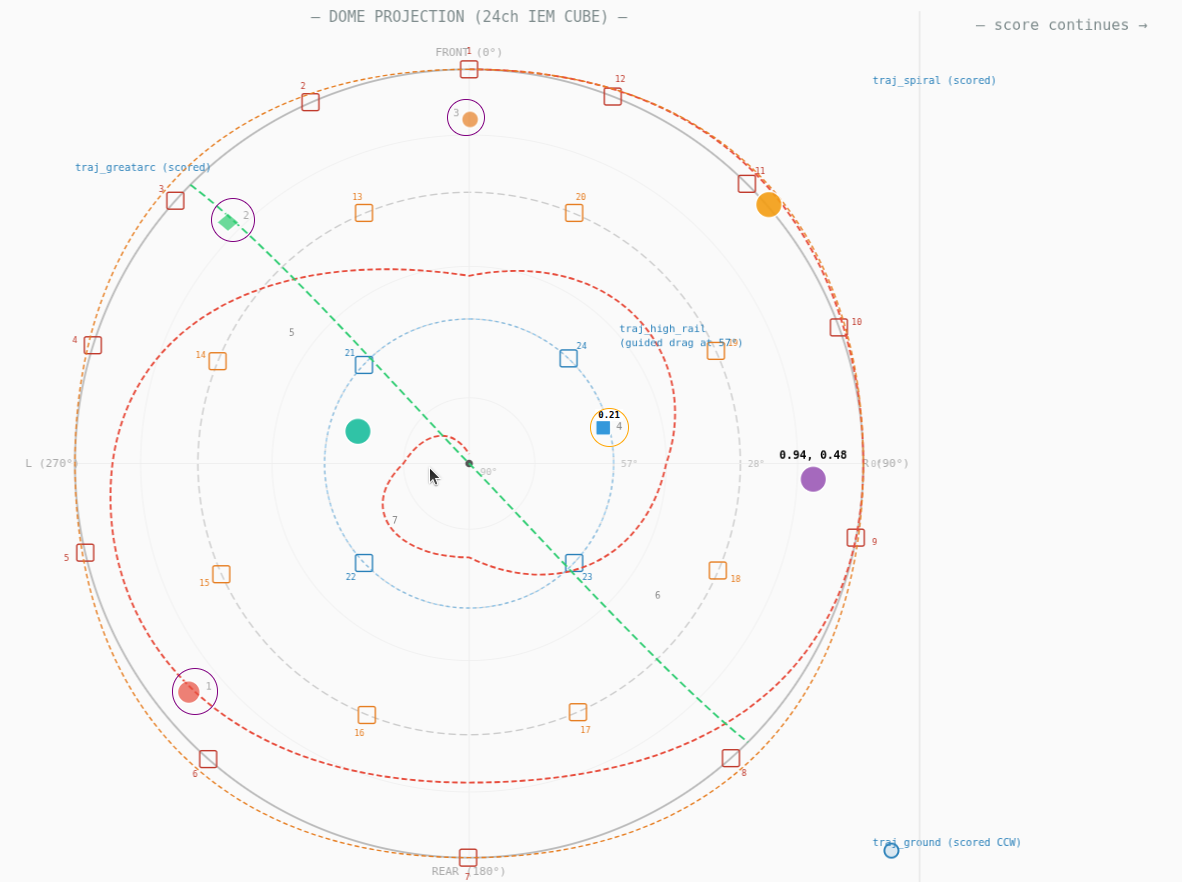
spatial-dome-24ch-score.svg — 24ch IEM CUBE
7 sources. spatial:dome, format:aed.
Source Type Control mode Movement
src1 o2p scored ④ Path + free drag 25s spiral horizon→zenith src2 o2p scored ④ Path + free drag 15s great circle FL→RR src3 o2p scored ④ Path + free drag 18s ground orbit CCW src4 o2p touch Guided rail High ring (60° elev) src5 controlXY free Unconstrained Full dome drag src6 controlXY free Unconstrained Full dome drag src7 controlXY free Unconstrained Full dome drag
All three scored sources use init:armed(...) and are therefore
mode ④ — they follow their paths when running, but become freely
draggable when paused. During the paused-free phase, they publish
to controlXY:<uid> channels and can be targeted by preset
sequences. Three free handles create a spatial mixing surface. Cross-cue bindings link src1
elevation to src3 amplitude: as the spiral source rises, the ground
orbiter swells.
Speakers: 8 ground + 8 upper-mid + 4 high + 1 zenith + 2 sub + 1 nadir. Hardware: RME MADI, 3× ADAT, or Dante network.
PRESETS, SEQUENCES, AND TWEENING
All three spatial control modes integrate with the existing preset and sequence systems. Spatial positions are stored, recalled, tweened, and sequenced using the same mechanisms as non-spatial controlXY and o2p.
What gets stored
Presets store the SVG-space positions (x, y) and rotation (p) of
each handle. When recalled, the spatial mapping layer recomputes
azimuth, elevation, and distance from the restored positions. This
means a preset saved in spatial:dome mode automatically produces
correct AED values on recall — no separate spatial preset format needed.
{ "presets": { "front_left": { "domeMixer": { "h_src4": { "x": 0.2, "y": 0.85, "p": 0.0 }, "h_src5": { "x": 0.6, "y": 0.5, "p": 0.0 } } } } }
Saving spatial presets
Preset panel: Press Alt+Shift+P, position sources, name and save with the 💾 button.
DSL (playhead-triggered):
DSL (button):
Console:
window.controlXYPresets.save('front_left'); window.controlXYPresets.save('front_left', 'domeMixer'); // specific pad
Recalling with tweening
Recall interpolates handle positions over time. During the tween, the spatial mapping runs continuously — the source moves smoothly through the spatial field, emitting OSC at every frame.
Instant recall (no tween):
ui(action:'controlXYRecall', preset:'front_left')
Smooth 3-second tween:
ui(action:'controlXYRecall', preset:'overhead', dur:3, ease:'easeInOutSine')
Elastic bounce:
ui(action:'controlXYRecall', preset:'zenith_cluster', dur:2, ease:'easeOutElastic')
Per-handle staggered timing:
window.controlXYPresets.recall('spread', { handles: { h_src4: { dur: 2, delay: 0, ease: 'easeInOutSine' }, h_src5: { dur: 1.5, delay: 0.5, ease: 'easeOutQuad' }, h_src6: { dur: 1, delay: 1, ease: 'easeOutElastic' } } });
This creates a staggered spatial gesture — sources spread out one after another with different arrival timings and easing curves.
Azimuth interpolation
When tweening between spatial positions, azimuth takes the
shortest arc. A source at 350° tweening to 10° takes the short
20° path forward, not the long 340° path backward. This is handled
by lerpAzimuth() in spatialMap.js.
In dome mode, tweening through positions near the zenith (center of the circle) naturally crosses overhead — the handle moves linearly through SVG space, and the spatial mapping produces the correct great-circle-like arc.
Sequences: spatial choreography
Sequences are playlists of spatial presets that play automatically, creating composed spatial trajectories from discrete snapshots.
Define a sequence (DSL):
ui(action:'controlXYDefineSequence', name:'orbit_snap', steps:'front_left,right,rear,left,front_left')
Play the sequence:
ui(action:'controlXYSequence', seq:'orbit_snap', dur:2, ease:'easeInOutSine', loop:true)
This creates a source that hops between four spatial positions in a looping cycle, spending 2 seconds tweening between each. Because the spatial mapping runs on every frame during the tween, the source emits a smooth continuous trajectory via OSC even though only four snapshots were saved.
Per-step timing (console):
window.controlXYPresets.defineSequence('spatial_phrase', [ { preset: 'front_left', dur: 2 }, { preset: 'zenith', dur: 4 }, { preset: 'rear_right', dur: 1 }, { preset: 'front_left', dur: 3 } ]);
window.controlXYPresets.playSequence('spatial_phrase', {
loop: true,
onStep: (step, preset) => console.log(→ ${preset})
});
Different durations per step create spatial phrasing — fast moves and slow sweeps in a single sequence.
Stop sequence:
ui(action:'controlXYSequenceStop')
Scenes
Scenes capture the state of all controlXY instances plus launcher state, allowing full-score spatial snapshots.
window.controlXYPresets.saveScene('opening'); window.controlXYPresets.recallScene('opening', { dur: 4 });
Buttons for live override
Performers can interrupt automated sequences with button-triggered preset recalls:
This creates a hybrid performance mode — the score automates spatial trajectories via sequences, but the performer can override at any moment by pressing a button.
Direct tweening without presets
Skip the preset system entirely and tween to arbitrary positions:
window.controlXYPresets.tweenTo({ domeMixer: { h_src4: { x: 0.5, y: 0.5 }, // center = zenith in dome h_src5: { x: 0.1, y: 0.9 }, // near edge = horizon h_src6: { x: 0.5, y: 0.5, p: 0.75 } } }, { dur: 3, ease: 'easeInOutSine' });
o2p touch presets
Touch-mode o2p sources use the o2p preset system (separate from
controlXY presets). Save positions along the path, build sequences
with timed transitions. The group: parameter enables shared preset
banks across multiple spatial sources.
Easing functions
All 15 easing curves are available for spatial tweening. By name or by number:
Number Name Character
0 linear Constant speed
1 easeInSine Slow start
2 easeOutSine Slow end
3 easeInOutSine Smooth both ends
4–6 easeIn/Out/InOutQuad Moderate acceleration
7–9 easeIn/Out/InOutCubic Strong acceleration
10–12 easeIn/Out/InOutBack Overshoot/anticipation
13 easeInElastic Elastic snap-in
14 easeOutElastic Bouncy arrival
easeInOutSine is the most natural for spatial movement.
easeOutElastic creates an oscillating arrival — useful for a source
that bounces around a target position before settling.
Persistence
Presets auto-save to scores/<project>/controlxy-presets.json and
load automatically when the project opens. Export/import via:
window.controlXYPresets.export() // → JSON string window.controlXYPresets.import(json) // ← JSON string
Compositional patterns for spatial presets
Orbit from snapshots: Save 4–8 positions around the dome edge.
Sequence them with equal durations and easeInOutSine. The source
orbits smoothly even though only discrete positions were stored.
Zenith dive: Save a horizon position and a zenith position (center of dome). Sequence: horizon → zenith → horizon with increasing speed per cycle.
Scatter/gather: Save a "clustered" preset (all sources near center) and a "spread" preset (sources at extremes). Tween between them — sources converge and diverge as a group.
Call and response: Manual drag for the "call" phrase, then trigger a sequence for the automated "response". Alternate between live and programmed spatial movement.
Polytemporal layers: Multiple controlXY pads, each with its own sequence at different loop lengths (3, 5, 7 steps). The spatial patterns phase against each other, creating evolving relationships.
DESIGN NOTES
Control mode comparison
┌─────────────────────┬──────────┬───────────┬──────────┬──────────────┐
│                     │ ① scored │ ② rail    │ ③ free   │ ④ scored+free│
├─────────────────────┼──────────┼───────────┼──────────┼──────────────┤
│ animated trajectory │    ✓     │           │          │  ✓ (running) │
│ path constrained    │ running  │  always   │          │  running     │
│ free drag           │          │           │    ✓     │  ✓ (paused)  │
│ spatial OSC (drag)  │          │     ✓     │    ✓     │  ✓ (paused)  │
│ spatial OSC (anim)  │    ✓     │           │          │  ✓ (running) │
│ presets / save      │          │           │    ✓     │  ✓ (paused)  │
│ sequences / tween   │          │           │    ✓     │  ✓ (paused)  │
│ resume from new pos │          │           │          │  ✓ nearest-t │
│ ParamBus channels   │ spatial  │ spatial   │ spatial  │ spatial +    │
│                     │ o2p      │ o2p       │ controlXY│ controlXY    │
└─────────────────────┴──────────┴───────────┴──────────┴──────────────┘
No redundancy: each mode occupies a distinct point in the design
space. Mode ④ is not a separate implementation but emerges from
the combination of init:armed(...) on an o2p element — the armed
lifecycle provides pause/resume, pause-drag provides free
positioning, and ParamBus bridging exposes the paused source to
the controlXY preset system.
Pause-drag mechanics
When a scored o2p animation is paused (click-to-stop), the source
marker becomes freely draggable. Requires init:armed(...) and
drag:1 in the DSL — the armed lifecycle provides the click-to-
pause/resume mechanism, and drag:1 enables the free repositioning.
During drag:
- Spatial OSC emits continuously (same format as when animated)
spatial:<uid>ParamBus channels publish AED + cartesiancontrolXY:<uid>ParamBus channels publish normalized x/y (making the source visible to the preset/sequence system)
On resume (click-to-start):
findNearestTOnPath()locates the closest point on the original path — coarse (50 steps) + fine (20 steps) binary searchcfg.startPosis NOT mutated — a one-shot_dragResumeTis setstartO2PForElement()restarts the animation from that point- First cycle runs from drag position; subsequent cycles use the original startPos/endPos range
- If the source was dragged far from the path, the snap is immediate — analogous to MIDI soft takeover
The source can be dragged anywhere, not just within the spatial bounds circle. When spatial bounds exist, the source clamps to the circle edge. Without bounds, drag is completely unconstrained.
Architecture principles
-
Spatial is a coordinate mapping layer, not a rewrite. o2p and controlXY work identically without
spatial:— it is opt-in. -
The P handle (rotation) maps to elevation in plan mode. In dome mode, elevation is in the radial position and P is free for other uses.
-
Format-agnostic OSC: change two parameters (
format:andoscAddr:) to switch between renderers. Score geometry, trajectory paths, and cross-cue bindings are unaffected. -
ParamBus integration: spatial channels are available for cross-cue modulation, preset interpolation, and signal routing via the same publish/subscribe system used by all Oscilla controls.
-
No scale logic in the DSL: musical and spatial semantics live downstream in the audio engine and renderer.
-
No DOM dependencies in spatialMap.js: pure math, testable outside the browser, suitable for server-side rendering or offline trajectory computation.
FILES
public/js/ control/ spatialMap.js Pure math coordinate mapping o2pTouch.js Pause-drag handlers + findNearestTOnPath controlXYPresets.js Preset save/recall/tween + sync broadcast o2pLauncher.js Launcher bar for o2p touch groups paramBus.js Publish/subscribe for cross-cue modulation paramBinding.js Signal binding helpers cues/ o2p.js Path animation + spatial emit + pause-drag animShared.js Armed lifecycle + arm_sync multi-client controlXY.js Multitouch XY pad + spatial emit + pos_sync animOverlays.js Hit labels + click dispatch system/ oscillaOSCClient.js OSC send/receive via WebSocket oscillaObserver.js Visibility observer (path-aware for o2p) socket.js WebSocket message routing server.js (repo root) WebSocket relay, OSC bridge, arm_sync relay
scores/ spatial-quad-score.svg 4ch demo score spatial-dome-8ch-score.svg 8ch cube demo score spatial-dome-24ch-score.svg 24ch IEM CUBE demo score (score.svg)
MULTI-CLIENT SYNC
Current state
One client acts as the authority for each animation. Interactions
(start, pause, resume) are broadcast instantly via arm_sync messages
relayed through the server. All connected clients see the same state
transitions in real time.
What syncs                          Mechanism
----------------------------------- ----------------------------------------
Armed start/pause/resume            arm_sync (instant relay via WebSocket)
Pause-drag resume position          arm_sync with resumeT field
controlXY manual drag               pos_sync (50ms throttle, best-effort)
controlXY preset/sequence recall    xy_preset_sync (sends resolved positions,
                                    each client tweens locally at 60fps)
Transport (play/pause/seek)         Existing broadcastState heartbeat
Limitations
Late-joining clients see armed elements but do not auto-start running animations. A connected client must stop and restart the animation to bring late joiners into sync. This is a known limitation.
Drift correction is not implemented. Animations may diverge slightly over long durations due to frame timing differences between clients.
Future: OSC follower architecture
The intended long-term approach is for follower clients to receive the spatial OSC stream from the authority (which is already flowing at high frequency) and place their objects at the received coordinates, rather than running independent local animations. This eliminates drift, late-join problems, and state sync entirely: followers are pure visualisers of the authority's OSC output. Design TBD.
FUTURE PHASES
Phase 2 -- OSC follower mode
Follower clients receive incoming spatial OSC and drive object positions directly from the stream. Inverse spatialMap converts AED coordinates back to SVG position on the path. One authority animates, everyone else visualises. Eliminates drift and late-join problems entirely.
Phase 3 -- Three.js monitor view
3D visualization of sources and speakers. Bidirectional control: drag sources in the 3D view and the SVG score updates, and vice versa.
Phase 4 -- Parametric generators in live console
Expose circularOrbit(), domeSpiral(), lissajous(), etc. in the
browser console for live-coding spatial trajectories during performance.
generatorToSVGPath() bakes them into the score for persistence.
Phase 5 -- Boids / particle-field generators
Multi-source swarm behaviour. N sources flock, scatter, or orbit as a group. Each publishes its own spatial channels. The swarm is a single cue that spawns many spatial OSC streams.
Tip: use ← → or ↑ ↓ to navigate the docs